
Turn on suggestions
Auto-suggest helps you quickly narrow down your search results by suggesting possible matches as you type.
Showing results for
EN
Turn on suggestions
Auto-suggest helps you quickly narrow down your search results by suggesting possible matches as you type.
Showing results for
- English
- :
- Forum
- :
- Documentation
- :
- Re: Veneer wall
Options
- Subscribe to RSS Feed
- Mark Topic as New
- Mark Topic as Read
- Pin this post for me
- Bookmark
- Subscribe to Topic
- Mute
- Printer Friendly Page

Farnoush Pourmoradi
Booster
Options
- Mark as New
- Bookmark
- Subscribe
- Mute
- Subscribe to RSS Feed
- Permalink
- Report Inappropriate Content
2024-04-26
04:24 AM
- last edited on
2024-05-02
05:49 AM
by
 Laszlo Nagy
Veneer wall
2024-04-26
04:24 AM
Hi there. How can I change a double brick veneer wall to a black solid veneer wall in my floor plan?
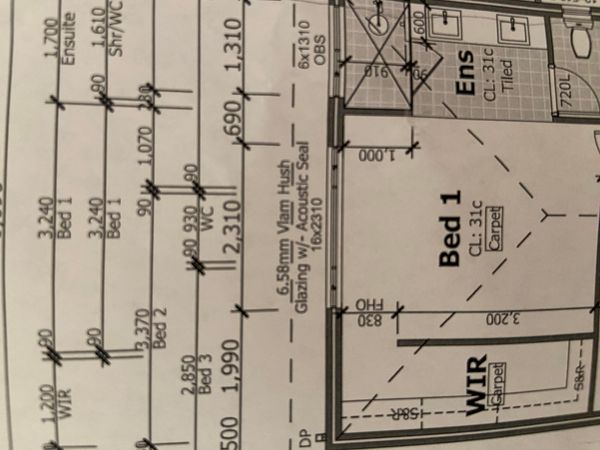
Operating system used: Mac Apple Silicon
Solved! Go to Solution.
2 Solutions
Accepted Solutions

mthd
Virtuoso
Options
- Mark as New
- Bookmark
- Subscribe
- Mute
- Subscribe to RSS Feed
- Permalink
- Report Inappropriate Content
2024-04-26 04:51 AM
2024-04-26
04:51 AM
The first part of this video should give you a generic method of how to create an external solid brick wall composite.
https://www.youtube.com/watch?v=WCGJMHn2BwY
Hope this helps ?
AC8.1 - AC29 ARM AUS + CI Tools
Apple Mac Studio M1 Max Chip 10C CPU
24C GPU 7.8TF 32GB RAM OS Sequoia.
Apple Mac Studio M1 Max Chip 10C CPU
24C GPU 7.8TF 32GB RAM OS Sequoia.
Solution

Barry Kelly
Moderator
Options
- Mark as New
- Bookmark
- Subscribe
- Mute
- Subscribe to RSS Feed
- Permalink
- Report Inappropriate Content
2024-04-26 05:43 AM - edited 2024-04-26 05:44 AM
2024-04-26
05:43 AM
This should all be in the default template.
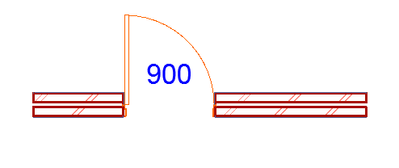
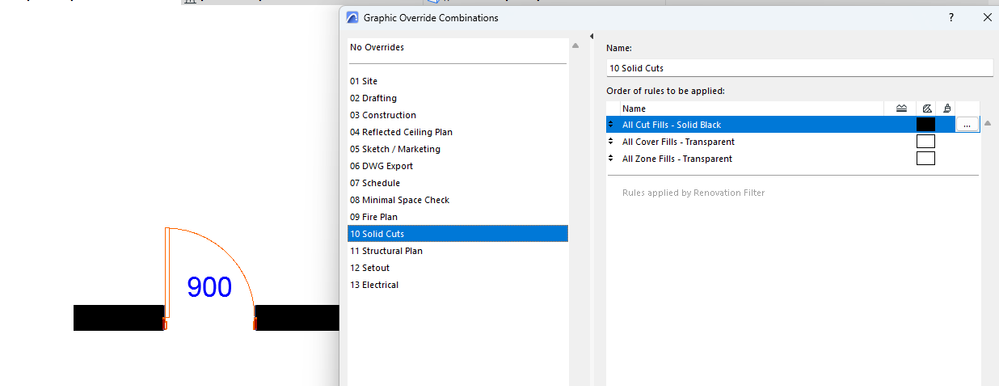
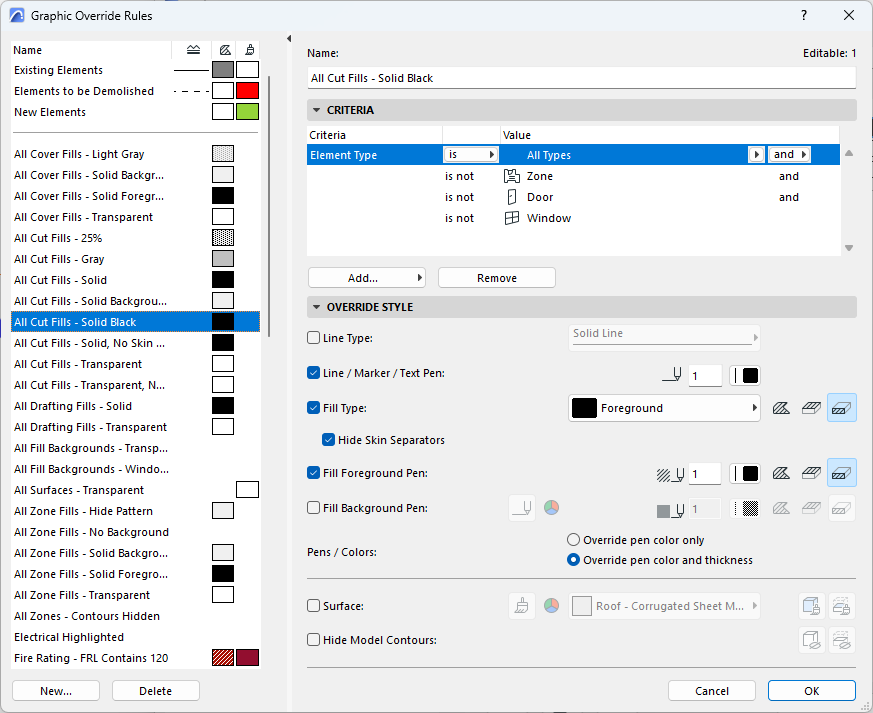
Barry.
One of the forum moderators.
Versions 6.5 to 27
i7-10700 @ 2.9Ghz, 32GB ram, GeForce RTX 2060 (6GB), Windows 10
Lenovo Thinkpad - i7-1270P 2.20 GHz, 32GB RAM, Nvidia T550, Windows 11
Versions 6.5 to 27
i7-10700 @ 2.9Ghz, 32GB ram, GeForce RTX 2060 (6GB), Windows 10
Lenovo Thinkpad - i7-1270P 2.20 GHz, 32GB RAM, Nvidia T550, Windows 11
Solution
24 Replies 24
Barry Kelly
Moderator
Options
- Mark as New
- Bookmark
- Subscribe
- Mute
- Subscribe to RSS Feed
- Permalink
- Report Inappropriate Content
2024-04-26 04:29 AM
2024-04-26
04:29 AM
You mean fill in the cavity?
Graphic Overrides will help.
You should have a rule that turns all cut fills solid & black.
Barry.
One of the forum moderators.
Versions 6.5 to 27
i7-10700 @ 2.9Ghz, 32GB ram, GeForce RTX 2060 (6GB), Windows 10
Lenovo Thinkpad - i7-1270P 2.20 GHz, 32GB RAM, Nvidia T550, Windows 11
Versions 6.5 to 27
i7-10700 @ 2.9Ghz, 32GB ram, GeForce RTX 2060 (6GB), Windows 10
Lenovo Thinkpad - i7-1270P 2.20 GHz, 32GB RAM, Nvidia T550, Windows 11
mthd
Virtuoso
Options
- Mark as New
- Bookmark
- Subscribe
- Mute
- Subscribe to RSS Feed
- Permalink
- Report Inappropriate Content
2024-04-26 04:51 AM
2024-04-26
04:51 AM
The first part of this video should give you a generic method of how to create an external solid brick wall composite.
https://www.youtube.com/watch?v=WCGJMHn2BwY
Hope this helps ?
AC8.1 - AC29 ARM AUS + CI Tools
Apple Mac Studio M1 Max Chip 10C CPU
24C GPU 7.8TF 32GB RAM OS Sequoia.
Apple Mac Studio M1 Max Chip 10C CPU
24C GPU 7.8TF 32GB RAM OS Sequoia.
Solution
Farnoush Pourmoradi
Booster
Options
- Mark as New
- Bookmark
- Subscribe
- Mute
- Subscribe to RSS Feed
- Permalink
- Report Inappropriate Content
2024-04-26 05:38 AM
2024-04-26
05:38 AM
I mean the double bricks should have shown in solid black.
Farnoush Pourmoradi
Booster
Options
- Mark as New
- Bookmark
- Subscribe
- Mute
- Subscribe to RSS Feed
- Permalink
- Report Inappropriate Content
2024-04-26 05:40 AM
2024-04-26
05:40 AM
Barry, the graphic overrides not working for this case. could you please provide more assistance?
Barry Kelly
Moderator
Options
- Mark as New
- Bookmark
- Subscribe
- Mute
- Subscribe to RSS Feed
- Permalink
- Report Inappropriate Content
2024-04-26 05:43 AM - edited 2024-04-26 05:44 AM
2024-04-26
05:43 AM
This should all be in the default template.
Barry.
One of the forum moderators.
Versions 6.5 to 27
i7-10700 @ 2.9Ghz, 32GB ram, GeForce RTX 2060 (6GB), Windows 10
Lenovo Thinkpad - i7-1270P 2.20 GHz, 32GB RAM, Nvidia T550, Windows 11
Versions 6.5 to 27
i7-10700 @ 2.9Ghz, 32GB ram, GeForce RTX 2060 (6GB), Windows 10
Lenovo Thinkpad - i7-1270P 2.20 GHz, 32GB RAM, Nvidia T550, Windows 11
Solution
Farnoush Pourmoradi
Booster
Options
- Mark as New
- Bookmark
- Subscribe
- Mute
- Subscribe to RSS Feed
- Permalink
- Report Inappropriate Content
2024-04-26 05:50 AM
2024-04-26
05:50 AM
Thanks Barry, how to show the cavity as a white colour?
Farnoush Pourmoradi
Booster
Options
- Mark as New
- Bookmark
- Subscribe
- Mute
- Subscribe to RSS Feed
- Permalink
- Report Inappropriate Content
2024-04-26 06:11 AM
2024-04-26
06:11 AM
Ignore above. Problem resolved. Please answer my question about window patterns in another post. Thank you so much
Barry Kelly
Moderator
Options
- Mark as New
- Bookmark
- Subscribe
- Mute
- Subscribe to RSS Feed
- Permalink
- Report Inappropriate Content
2024-04-26 06:18 AM
2024-04-26
06:18 AM
For that, I would just use an alternative pen set rather than Graphic Overrides.
Just have a pen set that turns the wall fill pen colours to black.
Of course this will affect anything else that uses those pen colours - so may not be the solution you are looking for.
But if the entire plan is to be black and white, that should not be a problem.
Barry.
One of the forum moderators.
Versions 6.5 to 27
i7-10700 @ 2.9Ghz, 32GB ram, GeForce RTX 2060 (6GB), Windows 10
Lenovo Thinkpad - i7-1270P 2.20 GHz, 32GB RAM, Nvidia T550, Windows 11
Versions 6.5 to 27
i7-10700 @ 2.9Ghz, 32GB ram, GeForce RTX 2060 (6GB), Windows 10
Lenovo Thinkpad - i7-1270P 2.20 GHz, 32GB RAM, Nvidia T550, Windows 11
Farnoush Pourmoradi
Booster
Options
- Mark as New
- Bookmark
- Subscribe
- Mute
- Subscribe to RSS Feed
- Permalink
- Report Inappropriate Content
2024-04-26 06:29 AM
2024-04-26
06:29 AM
BarrySorry for bothering you again. I set my floor plan to all black solid fills, but when I switch to another view and come back to the floor plan, it resets to the previous setting.

Still looking?

