
Turn on suggestions
Auto-suggest helps you quickly narrow down your search results by suggesting possible matches as you type.
Showing results for
EN
Turn on suggestions
Auto-suggest helps you quickly narrow down your search results by suggesting possible matches as you type.
Showing results for
Options
- Subscribe to RSS Feed
- Mark Topic as New
- Mark Topic as Read
- Pin this post for me
- Bookmark
- Subscribe to Topic
- Mute
- Printer Friendly Page

Karol Argasinski
Advocate
Options
- Mark as New
- Bookmark
- Subscribe
- Mute
- Subscribe to RSS Feed
- Permalink
- Report Inappropriate Content
2023-02-03 11:20 AM
Beam Volume missing?
2023-02-03
11:20 AM
Dear All,
I have the weird feeling that some options are not there anymore. In that case it is a Beam Volume. I wanted to check it in profile beam, but there is no option to choose from.
I even checked different language versions and help files and you can see the graphics, that there is volume in one (example: AC18) and in the newer one (example: AC24)
Please advise what can be done here.
Best
Karol
OPENBIM does works! 
ArchiCAD 22/23/24/25/26/27/28/29 INT &POL
AMD Ryzen 7 3700X, 128GB RAM, GeForce RTX 3070, Windows 11 Pro
MBP 14 M3 Max 16C/40G, 128GB, 2TB
http://www.bimfaktoria.pl/
ArchiCAD 22/23/24/25/26/27/28/29 INT &POL
AMD Ryzen 7 3700X, 128GB RAM, GeForce RTX 3070, Windows 11 Pro
MBP 14 M3 Max 16C/40G, 128GB, 2TB
http://www.bimfaktoria.pl/
Labels:
- Labels:
-
Beams
-
Composites
-
Other
-
Solid Element Operations
6 Replies 6

Barry Kelly
Moderator
Options
- Mark as New
- Bookmark
- Subscribe
- Mute
- Subscribe to RSS Feed
- Permalink
- Report Inappropriate Content
2023-02-03 12:53 PM
2023-02-03
12:53 PM
Where are you trying to use it?
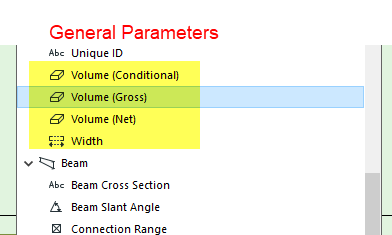
For labels and schedules you can just use the volumes in 'General Parameters'.
It seems these 'General' volumes are used for all (most) elements now except for column core and column veneer volumes.
Barry.
One of the forum moderators.
Versions 6.5 to 27
i7-10700 @ 2.9Ghz, 32GB ram, GeForce RTX 2060 (6GB), Windows 10
Lenovo Thinkpad - i7-1270P 2.20 GHz, 32GB RAM, Nvidia T550, Windows 11
Versions 6.5 to 27
i7-10700 @ 2.9Ghz, 32GB ram, GeForce RTX 2060 (6GB), Windows 10
Lenovo Thinkpad - i7-1270P 2.20 GHz, 32GB RAM, Nvidia T550, Windows 11
Karol Argasinski
Advocate
Options
- Mark as New
- Bookmark
- Subscribe
- Mute
- Subscribe to RSS Feed
- Permalink
- Report Inappropriate Content
2023-02-03 12:56 PM
2023-02-03
12:56 PM
Hi Barry,
what if I have complex profile modeled (i.E foundation) and I want to see different materials‘ volume being scheduled?
best
Karol
OPENBIM does works!
ArchiCAD 22/23/24/25/26/27/28/29 INT &POL
AMD Ryzen 7 3700X, 128GB RAM, GeForce RTX 3070, Windows 11 Pro
MBP 14 M3 Max 16C/40G, 128GB, 2TB
http://www.bimfaktoria.pl/
ArchiCAD 22/23/24/25/26/27/28/29 INT &POL
AMD Ryzen 7 3700X, 128GB RAM, GeForce RTX 3070, Windows 11 Pro
MBP 14 M3 Max 16C/40G, 128GB, 2TB
http://www.bimfaktoria.pl/

Andrii Levko
Expert
Options
- Mark as New
- Bookmark
- Subscribe
- Mute
- Subscribe to RSS Feed
- Permalink
- Report Inappropriate Content
2023-02-03 01:10 PM
2023-02-03
01:10 PM
Hi Karol
Just use component schedule

Andrii
AC 8.1 - 28 INT/POL 3001
Win11
AC 8.1 - 28 INT/POL 3001
Win11
Barry Kelly
Moderator
Options
- Mark as New
- Bookmark
- Subscribe
- Mute
- Subscribe to RSS Feed
- Permalink
- Report Inappropriate Content
2023-02-03 01:13 PM
2023-02-03
01:13 PM
In a component schedule you can use 'Component Volume'.
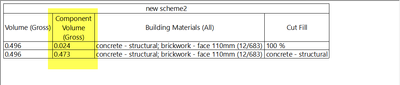
At the moment though I can't see how you can tell which Building Material it is for though.
I can only list all of the building materials.
Barry.
One of the forum moderators.
Versions 6.5 to 27
i7-10700 @ 2.9Ghz, 32GB ram, GeForce RTX 2060 (6GB), Windows 10
Lenovo Thinkpad - i7-1270P 2.20 GHz, 32GB RAM, Nvidia T550, Windows 11
Versions 6.5 to 27
i7-10700 @ 2.9Ghz, 32GB ram, GeForce RTX 2060 (6GB), Windows 10
Lenovo Thinkpad - i7-1270P 2.20 GHz, 32GB RAM, Nvidia T550, Windows 11
Andrii Levko
Expert
Options
- Mark as New
- Bookmark
- Subscribe
- Mute
- Subscribe to RSS Feed
- Permalink
- Report Inappropriate Content
2023-02-03 01:28 PM
2023-02-03
01:28 PM
Hi Barry
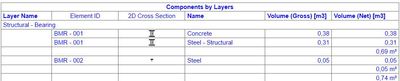
What can't you see? As for me, everything is visible.
Andrii
AC 8.1 - 28 INT/POL 3001
Win11
AC 8.1 - 28 INT/POL 3001
Win11
Barry Kelly
Moderator
Options
- Mark as New
- Bookmark
- Subscribe
- Mute
- Subscribe to RSS Feed
- Permalink
- Report Inappropriate Content
2023-02-03 04:06 PM
2023-02-03
04:06 PM
All good now.
You have to add the 'Name' from the Building Material list and not 'Building Materials' from the General list.
Thanks.
Barry.
One of the forum moderators.
Versions 6.5 to 27
i7-10700 @ 2.9Ghz, 32GB ram, GeForce RTX 2060 (6GB), Windows 10
Lenovo Thinkpad - i7-1270P 2.20 GHz, 32GB RAM, Nvidia T550, Windows 11
Versions 6.5 to 27
i7-10700 @ 2.9Ghz, 32GB ram, GeForce RTX 2060 (6GB), Windows 10
Lenovo Thinkpad - i7-1270P 2.20 GHz, 32GB RAM, Nvidia T550, Windows 11

Still looking?

Suggested topics
- Concrete column not subtracted from brick wall in Component Volume (Net) Schedule in Project data & BIM
- Profile Beam - showing projection of bottom face in plan? in Modeling
- PBC between columns and wall - how to control the surface of the removed part in Modeling
- Non metric, steel shapes missing in AC29 (W shaped beams,etc) in Libraries & objects
- Zones driving me insane in Documentation
