
Turn on suggestions
Auto-suggest helps you quickly narrow down your search results by suggesting possible matches as you type.
Showing results for
EN
Turn on suggestions
Auto-suggest helps you quickly narrow down your search results by suggesting possible matches as you type.
Showing results for
Options
- Subscribe to RSS Feed
- Mark Topic as New
- Mark Topic as Read
- Pin this post for me
- Bookmark
- Subscribe to Topic
- Mute
- Printer Friendly Page

SJPHouse2
Contributor
Options
- Mark as New
- Bookmark
- Subscribe
- Mute
- Subscribe to RSS Feed
- Permalink
- Report Inappropriate Content
2022-02-08 08:05 PM
Purge Unused Surfaces
2022-02-08
08:05 PM
Hello - is there a way to purge unused surfaces more than one at a time as a group - or is it only possible to purge them one by one via Options > Element Attributes > Surfaces? Thanks!
Mac OS Big Sur / AC23
Solved! Go to Solution.
Solved
Read-Only
1 Solution
Accepted Solutions

Barry Kelly
Moderator
Options
- Mark as New
- Bookmark
- Subscribe
- Mute
- Subscribe to RSS Feed
- Permalink
- Report Inappropriate Content
2022-02-09 03:33 AM
2022-02-09
03:33 AM
@SJPHouse2 wrote:
I don't have that as an option - 'Attribute Manager' does not appear
It looks like you might be using a custom Work Environment?
Attribute manager should be there in the standard WE.
Or you can add it you your own custom WE if you want.
Also look in your tool bars - you may have it as a button somewhere.
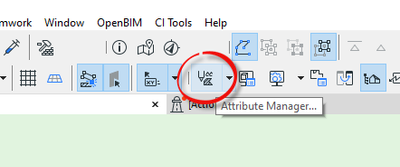
Barry.
One of the forum moderators.
Versions 6.5 to 27
i7-10700 @ 2.9Ghz, 32GB ram, GeForce RTX 2060 (6GB), Windows 10
Lenovo Thinkpad - i7-1270P 2.20 GHz, 32GB RAM, Nvidia T550, Windows 11
Versions 6.5 to 27
i7-10700 @ 2.9Ghz, 32GB ram, GeForce RTX 2060 (6GB), Windows 10
Lenovo Thinkpad - i7-1270P 2.20 GHz, 32GB RAM, Nvidia T550, Windows 11
Solution
5 Replies 5

hevi
Ace
Options
- Mark as New
- Bookmark
- Subscribe
- Mute
- Subscribe to RSS Feed
- Permalink
- Report Inappropriate Content
2022-02-08 08:37 PM - last edited on 2022-02-09 02:52 AM by Barry Kelly
2022-02-08
08:37 PM
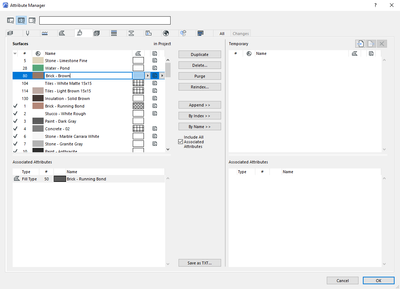
Yes, through Options > Element Attributes > Attribute Manager.
It allows for batch purge of unused attributes. Used attributes are indicated by the checkmark and for it to be considered unused it cannot be used in placed elements, favorites and tool defaults, or other attributes.

Lingwisyer
Guru
Options
- Mark as New
- Bookmark
- Subscribe
- Mute
- Subscribe to RSS Feed
- Permalink
- Report Inappropriate Content
2022-02-09 02:43 AM
2022-02-09
02:43 AM
Though I am pretty sure the "used" attributes includes anything in your favourites...
| AC22-29 AUS 3200 | Help Those Help You - Add a Signature |
| Self-taught, bend it till it breaks | Creating a Thread |
| Win11 | i9 10850K | 64GB | RX6600 | Win11 | 7800X3D | 32GB | RTX5070TI |
SJPHouse2
Contributor
Options
- Mark as New
- Bookmark
- Subscribe
- Mute
- Subscribe to RSS Feed
- Permalink
- Report Inappropriate Content
2022-02-09 03:21 AM
2022-02-09
03:21 AM
I don't have that as an option - 'Attribute Manager' does not appear- are you running AC23 or an earlier or later version?

Barry Kelly
Moderator
Options
- Mark as New
- Bookmark
- Subscribe
- Mute
- Subscribe to RSS Feed
- Permalink
- Report Inappropriate Content
2022-02-09 03:33 AM
2022-02-09
03:33 AM
@SJPHouse2 wrote:
I don't have that as an option - 'Attribute Manager' does not appear
It looks like you might be using a custom Work Environment?
Attribute manager should be there in the standard WE.
Or you can add it you your own custom WE if you want.
Also look in your tool bars - you may have it as a button somewhere.
Barry.
One of the forum moderators.
Versions 6.5 to 27
i7-10700 @ 2.9Ghz, 32GB ram, GeForce RTX 2060 (6GB), Windows 10
Lenovo Thinkpad - i7-1270P 2.20 GHz, 32GB RAM, Nvidia T550, Windows 11
Versions 6.5 to 27
i7-10700 @ 2.9Ghz, 32GB ram, GeForce RTX 2060 (6GB), Windows 10
Lenovo Thinkpad - i7-1270P 2.20 GHz, 32GB RAM, Nvidia T550, Windows 11
Solution
SJPHouse2
Contributor
Options
- Mark as New
- Bookmark
- Subscribe
- Mute
- Subscribe to RSS Feed
- Permalink
- Report Inappropriate Content
2022-02-09 05:08 AM
2022-02-09
05:08 AM
Hi Barry - looking for the button did it, thank you!

Still looking?

