
Turn on suggestions
Auto-suggest helps you quickly narrow down your search results by suggesting possible matches as you type.
Showing results for
EN
Turn on suggestions
Auto-suggest helps you quickly narrow down your search results by suggesting possible matches as you type.
Showing results for
Options
- Subscribe to RSS Feed
- Mark Topic as New
- Mark Topic as Read
- Pin this post for me
- Bookmark
- Subscribe to Topic
- Mute
- Printer Friendly Page

Ron
Booster
Options
- Mark as New
- Bookmark
- Subscribe
- Mute
- Subscribe to RSS Feed
- Permalink
- Report Inappropriate Content
2022-09-01 07:49 PM - last edited on 2022-09-01 11:37 PM by Karl Ottenstein
Railing and bringing a V25 plan into V26
2022-09-01
07:49 PM
Started playing with V26 with its template. If I pull up the railing tool and favorites it has several built in railing styles.
So I decided to bring in a project from V25 to utilize those rails but when I go to the railing tool none of those rail styles are there. I did migrate the file. Is this because I'm using my former work environment profile. I know in past upgrades if you used a former profile not all new features worked. I would hate to have to spend the time re creating a new enviro in order to use new features and that would require days of bringing in my custom fills, materials and layouts.
Read-Only
5 Replies 5

SenecaDesignLLC
Ace
Options
- Mark as New
- Bookmark
- Subscribe
- Mute
- Subscribe to RSS Feed
- Permalink
- Report Inappropriate Content
2022-09-01 10:59 PM
2022-09-01
10:59 PM
You need to load the favorites from the other template.
Ron
Booster
Options
- Mark as New
- Bookmark
- Subscribe
- Mute
- Subscribe to RSS Feed
- Permalink
- Report Inappropriate Content
2022-09-01 11:00 PM
2022-09-01
11:00 PM
And how do you do that?

Barry Kelly
Moderator
Options
- Mark as New
- Bookmark
- Subscribe
- Mute
- Subscribe to RSS Feed
- Permalink
- Report Inappropriate Content
2022-09-02 03:16 AM
2022-09-02
03:16 AM
@Ron wrote:
And how do you do that?
If you have opened the original 25 file in 26, the favourites should be there already.
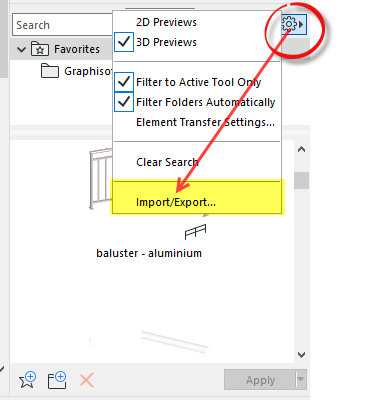
Otherwise you can go into the favourites settings (the cog symbol in the favourites dialogue) and 'Import' the favourites from another PLN file.
Barry.
One of the forum moderators.
Versions 6.5 to 27
i7-10700 @ 2.9Ghz, 32GB ram, GeForce RTX 2060 (6GB), Windows 10
Lenovo Thinkpad - i7-1270P 2.20 GHz, 32GB RAM, Nvidia T550, Windows 11
Versions 6.5 to 27
i7-10700 @ 2.9Ghz, 32GB ram, GeForce RTX 2060 (6GB), Windows 10
Lenovo Thinkpad - i7-1270P 2.20 GHz, 32GB RAM, Nvidia T550, Windows 11
Ron
Booster
Options
- Mark as New
- Bookmark
- Subscribe
- Mute
- Subscribe to RSS Feed
- Permalink
- Report Inappropriate Content
2022-09-07 04:19 PM
2022-09-07
04:19 PM
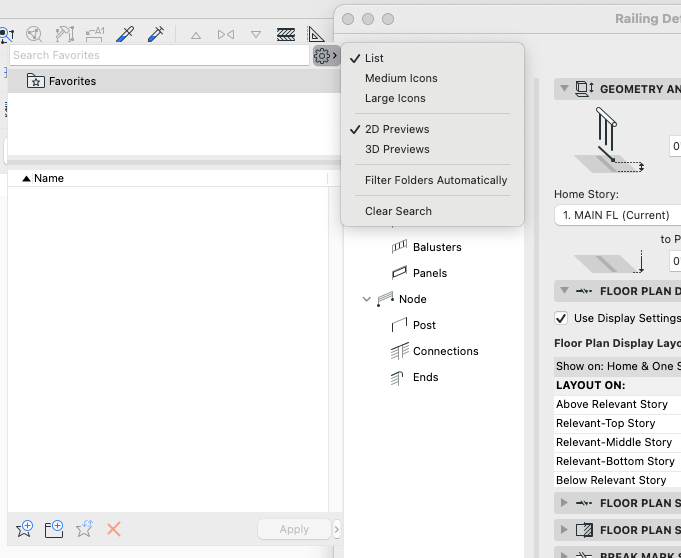
there does not appear to be a import feature see attached pdf
Barry Kelly
Moderator
Options
- Mark as New
- Bookmark
- Subscribe
- Mute
- Subscribe to RSS Feed
- Permalink
- Report Inappropriate Content
2022-09-08 03:55 AM
2022-09-08
03:55 AM
Not in the railing tool settings.
Try the actual 'Favourites' palette (can be turned on in WINDOWS menu > Palettes).
Barry.
One of the forum moderators.
Versions 6.5 to 27
i7-10700 @ 2.9Ghz, 32GB ram, GeForce RTX 2060 (6GB), Windows 10
Lenovo Thinkpad - i7-1270P 2.20 GHz, 32GB RAM, Nvidia T550, Windows 11
Versions 6.5 to 27
i7-10700 @ 2.9Ghz, 32GB ram, GeForce RTX 2060 (6GB), Windows 10
Lenovo Thinkpad - i7-1270P 2.20 GHz, 32GB RAM, Nvidia T550, Windows 11

Still looking?
Suggested topics
- Railing break mark in Modeling
- Detailing | Better methods of 2d drafting, creation of Blocks , Detail Elements , 2d Objects in Documentation
- Railing - Post view settings with project2... fragment2 - background foreground in Libraries & objects
- How to schedule the surface area (m2) of a Complex Profile used as a Railing sub-element? in Project data & BIM
- rails added to handrail not showing in 3d or elevation in Libraries & objects
