
Turn on suggestions
Auto-suggest helps you quickly narrow down your search results by suggesting possible matches as you type.
Showing results for
EN
Turn on suggestions
Auto-suggest helps you quickly narrow down your search results by suggesting possible matches as you type.
Showing results for
Options
- Subscribe to RSS Feed
- Mark Topic as New
- Mark Topic as Read
- Pin this post for me
- Bookmark
- Subscribe to Topic
- Mute
- Printer Friendly Page

Noah Kern
Participant
Options
- Mark as New
- Bookmark
- Subscribe
- Mute
- Subscribe to RSS Feed
- Permalink
- Report Inappropriate Content
2023-07-20 03:26 PM
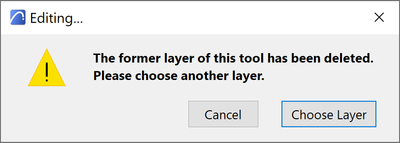
The Former layer has been deleted. Please choose another layer
2023-07-20
03:26 PM
Hi, every time I want to place a zone it says "The former layer has been deleted. Please choose another layer."
When I turn off the annotation this problem does not appear.
Is there a setting where I can choose a layer for the annotation because the zone itself has a layer or is there anything else I can do to solve the problem?
Solved! Go to Solution.
1 Solution
Accepted Solutions

hevi
Ace
Options
- Mark as New
- Bookmark
- Subscribe
- Mute
- Subscribe to RSS Feed
- Permalink
- Report Inappropriate Content
2023-08-09 09:15 PM - edited 2023-08-09 09:16 PM
2023-08-09
09:15 PM
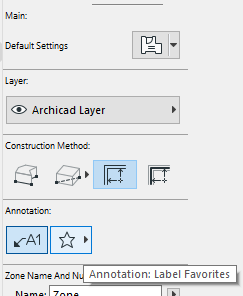
It's likely the layer of the label that has been deleted and is missing that is causing this.
So either turn off the label in the zone tool or make sure that the relevant default/favorite label has an active label.
2 Replies 2

Steve Jepson
Virtuoso
Options
- Mark as New
- Bookmark
- Subscribe
- Mute
- Subscribe to RSS Feed
- Permalink
- Report Inappropriate Content
2023-08-09 08:46 PM
2023-08-09
08:46 PM
What do you mean by "turn off the annotation"?
ArchiCAD 25 7000 USA - Windows 10 Pro 64x - Dell 7720 64 GB 2400MHz ECC - Xeon E3 1535M v6 4.20GHz - (2) 1TB M.2 PCIe Class 50 SSD's - 17.3" UHD IPS (3840x2160) - Nvidia Quadro P5000 16GB GDDR5 - Maxwell Studio/Render 5.2.1.49- Multilight 2 - Adobe Acrobat Pro - ArchiCAD 6 -25
hevi
Ace
Options
- Mark as New
- Bookmark
- Subscribe
- Mute
- Subscribe to RSS Feed
- Permalink
- Report Inappropriate Content
2023-08-09 09:15 PM - edited 2023-08-09 09:16 PM
2023-08-09
09:15 PM
It's likely the layer of the label that has been deleted and is missing that is causing this.
So either turn off the label in the zone tool or make sure that the relevant default/favorite label has an active label.

Still looking?

Suggested topics
- Some free useful objects: Road signs, parametric pathway, roof crickets, crowds in Libraries & objects
- pdf are to LARGE I can't print or present in Documentation
- Forma Connector - Choose Destination Folder not pulling full list in Collaboration with other software
- Roof Builder disapears with skylight input. in Modeling
- can't delete or edit unlocked and ungrouped object in Modeling
