
Turn on suggestions
Auto-suggest helps you quickly narrow down your search results by suggesting possible matches as you type.
Showing results for
EN
Turn on suggestions
Auto-suggest helps you quickly narrow down your search results by suggesting possible matches as you type.
Showing results for
Options
- Subscribe to RSS Feed
- Mark Topic as New
- Mark Topic as Read
- Pin this post for me
- Bookmark
- Subscribe to Topic
- Mute
- Printer Friendly Page

Giovannino60
Participant
Options
- Mark as New
- Bookmark
- Subscribe
- Mute
- Subscribe to RSS Feed
- Permalink
- Report Inappropriate Content
2022-11-23
04:15 PM
- last edited on
2025-01-31
12:55 PM
by
 Molinda Prey
There is a button in Archicad to connect two walls, where can I find it?
2022-11-23
04:15 PM
There is a button in Archicad to connect two walls, where can I find it? Why does a wall come out with the finish with stones even if not chosen this finish with stones in the outer headboard?
Thank you


Solved! Go to Solution.
Solved
Labels:
- Labels:
-
Connections
-
Walls
1 Solution
Accepted Solutions

Lingwisyer
Guru
Options
- Mark as New
- Bookmark
- Subscribe
- Mute
- Subscribe to RSS Feed
- Permalink
- Report Inappropriate Content
2022-11-24 04:22 AM
2022-11-24
04:22 AM
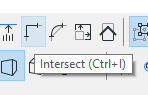
On the Standard toolbar.
| AC22-29 AUS 3200 | Help Those Help You - Add a Signature |
| Self-taught, bend it till it breaks | Creating a Thread |
| Win11 | i9 10850K | 64GB | RX6600 | Win11 | 7800X3D | 32GB | RTX5070TI |
Solution
8 Replies 8

Erwin Edel
Rockstar
Options
- Mark as New
- Bookmark
- Subscribe
- Mute
- Subscribe to RSS Feed
- Permalink
- Report Inappropriate Content
2022-11-23 04:33 PM
2022-11-23
04:33 PM
Edit > Reshape > Intersect
However I would recommend turning on the Edit Elements toolbar instead.
You probably have overridden the surface of the wall if it is not showing the surface of the building material.
Checl the Override Surfaces buttons in the Model tab of the Wall Default Settings.
Erwin Edel, Project Lead, Leloup Architecten
www.leloup.nl
ArchiCAD 9-29NED FULL
Windows 11 Pro for Workstations
Adobe Design Premium CS5
www.leloup.nl
ArchiCAD 9-29NED FULL
Windows 11 Pro for Workstations
Adobe Design Premium CS5
Giovannino60
Participant
Options
- Mark as New
- Bookmark
- Subscribe
- Mute
- Subscribe to RSS Feed
- Permalink
- Report Inappropriate Content
2022-11-23 04:56 PM
2022-11-23
04:56 PM
However I would recommend turning on the Edit Elements toolbar instead: However I would recommend turning on the Edit Elements toolbar instead.
Anyway I tried to delete the wall but there are not two overlapping walls.
Thank you
Lingwisyer
Guru
Options
- Mark as New
- Bookmark
- Subscribe
- Mute
- Subscribe to RSS Feed
- Permalink
- Report Inappropriate Content
2022-11-24 02:30 AM
2022-11-24
02:30 AM
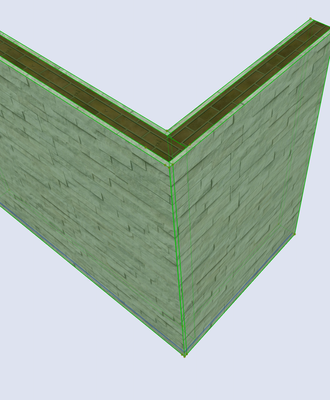
Ctrl + I
The stone is your wall composites core building material. When your wall is intersection properly, it will not show.
Ling.
| AC22-29 AUS 3200 | Help Those Help You - Add a Signature |
| Self-taught, bend it till it breaks | Creating a Thread |
| Win11 | i9 10850K | 64GB | RX6600 | Win11 | 7800X3D | 32GB | RTX5070TI |
Giovannino60
Participant
Options
- Mark as New
- Bookmark
- Subscribe
- Mute
- Subscribe to RSS Feed
- Permalink
- Report Inappropriate Content
2022-11-24 04:00 AM
2022-11-24
04:00 AM
If you select both walls with the mouse, ctrl+mouse, which is the button that gives the command: fillet or intersect? Can you send me a screen shot of this button? Thank you
Lingwisyer
Guru
Options
- Mark as New
- Bookmark
- Subscribe
- Mute
- Subscribe to RSS Feed
- Permalink
- Report Inappropriate Content
2022-11-24 04:22 AM
2022-11-24
04:22 AM
On the Standard toolbar.
| AC22-29 AUS 3200 | Help Those Help You - Add a Signature |
| Self-taught, bend it till it breaks | Creating a Thread |
| Win11 | i9 10850K | 64GB | RX6600 | Win11 | 7800X3D | 32GB | RTX5070TI |
Solution

Barry Kelly
Moderator
Options
- Mark as New
- Bookmark
- Subscribe
- Mute
- Subscribe to RSS Feed
- Permalink
- Report Inappropriate Content
2022-11-24 04:28 AM - edited 2022-11-24 06:32 AM
2022-11-24
04:28 AM
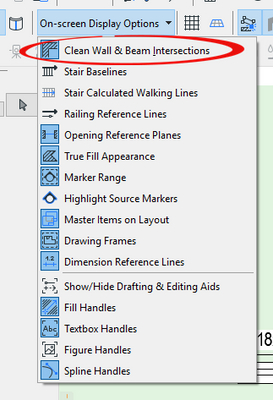
Also in your 'On-screen Display Option' make sure that 'Clean Wall & Beam Intersections' is turned on.
This will automatically trim walls as you place them when the walls touch in plan.
Barry.
One of the forum moderators.
Versions 6.5 to 27
i7-10700 @ 2.9Ghz, 32GB ram, GeForce RTX 2060 (6GB), Windows 10
Lenovo Thinkpad - i7-1270P 2.20 GHz, 32GB RAM, Nvidia T550, Windows 11
Versions 6.5 to 27
i7-10700 @ 2.9Ghz, 32GB ram, GeForce RTX 2060 (6GB), Windows 10
Lenovo Thinkpad - i7-1270P 2.20 GHz, 32GB RAM, Nvidia T550, Windows 11
Giovannino60
Participant
Options
- Mark as New
- Bookmark
- Subscribe
- Mute
- Subscribe to RSS Feed
- Permalink
- Report Inappropriate Content
2022-11-24 04:43 AM
2022-11-24
04:43 AM
Where do I find this command: Clean wall...?
Barry Kelly
Moderator
Options
- Mark as New
- Bookmark
- Subscribe
- Mute
- Subscribe to RSS Feed
- Permalink
- Report Inappropriate Content
2022-11-24 06:36 AM - edited 2022-11-24 06:36 AM
2022-11-24
06:36 AM
It is an 'On-Screen Display Option' which you will find in the VIEW menu.
Exactly where I can't say as I don't have the default Work Environment loaded.
Mine has probably been customised.
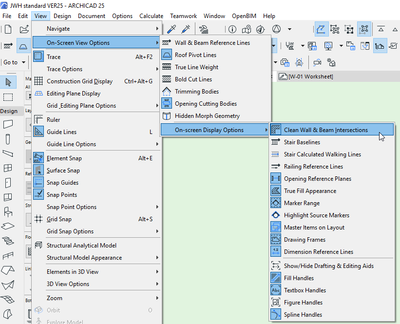
It should already be turned on by default.
You really don't want to ever turn it off.
Barry.
One of the forum moderators.
Versions 6.5 to 27
i7-10700 @ 2.9Ghz, 32GB ram, GeForce RTX 2060 (6GB), Windows 10
Lenovo Thinkpad - i7-1270P 2.20 GHz, 32GB RAM, Nvidia T550, Windows 11
Versions 6.5 to 27
i7-10700 @ 2.9Ghz, 32GB ram, GeForce RTX 2060 (6GB), Windows 10
Lenovo Thinkpad - i7-1270P 2.20 GHz, 32GB RAM, Nvidia T550, Windows 11

Still looking?

Suggested topics
- Issues with 3Dconnexxion CadMouse Pro Wireless in Installation & update
- Doors and Windows Schedule Automatic Dimension Button not Responding in Project data & BIM
- Button to activate or deactivate 3d editting plane. in Project data & BIM
- Template update AC27 to AC29 - Textures missing in Project data & BIM
- Profile Stack 2D Detail object in Libraries & objects
