
Turn on suggestions
Auto-suggest helps you quickly narrow down your search results by suggesting possible matches as you type.
Showing results for
EN
Turn on suggestions
Auto-suggest helps you quickly narrow down your search results by suggesting possible matches as you type.
Showing results for
Options
- Subscribe to RSS Feed
- Mark Topic as New
- Mark Topic as Read
- Pin this post for me
- Bookmark
- Subscribe to Topic
- Mute
- Printer Friendly Page

BenATA
Booster
Options
- Mark as New
- Bookmark
- Subscribe
- Mute
- Subscribe to RSS Feed
- Permalink
- Report Inappropriate Content
2022-07-01
07:36 AM
- last edited on
2022-09-20
05:24 PM
by
 Oleksandra Vakariuk
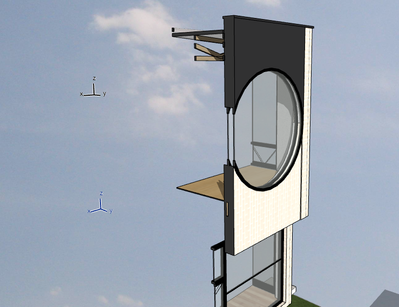
Why are there two Origin Points showing in my model?
2022-07-01
07:36 AM
Hi All,
I am curious to know why are there two Origin Points showing in my model?
See image below:
Thanks!
Ben
AC23
Cheers,
Ben
ArchiCAD 23 -amp; 26
MacOS 12 - 13
Ben
ArchiCAD 23 -amp; 26
MacOS 12 - 13
Solved! Go to Solution.
1 Solution
Accepted Solutions

hevi
Ace
Options
- Mark as New
- Bookmark
- Subscribe
- Mute
- Subscribe to RSS Feed
- Permalink
- Report Inappropriate Content
2022-07-01 08:45 AM - edited 2022-07-01 09:18 AM
2022-07-01
08:45 AM
You have set a User Origin. You can return it to the Project Origin by double-clicking the User Origin icon in the standard toolbar.

6 Replies 6

Lee Hankins
Virtuoso
Options
- Mark as New
- Bookmark
- Subscribe
- Mute
- Subscribe to RSS Feed
- Permalink
- Report Inappropriate Content
2022-07-01 07:53 AM
2022-07-01
07:53 AM
I think one of them is part of the editing plane.
Lee Hankins
ArchiCAD 4.5 - Archicad 29
macOS Tahoe (26.0)
ArchiCAD 4.5 - Archicad 29
macOS Tahoe (26.0)
hevi
Ace
Options
- Mark as New
- Bookmark
- Subscribe
- Mute
- Subscribe to RSS Feed
- Permalink
- Report Inappropriate Content
2022-07-01 08:45 AM - edited 2022-07-01 09:18 AM
2022-07-01
08:45 AM
You have set a User Origin. You can return it to the Project Origin by double-clicking the User Origin icon in the standard toolbar.
BenATA
Booster
Options
- Mark as New
- Bookmark
- Subscribe
- Mute
- Subscribe to RSS Feed
- Permalink
- Report Inappropriate Content
2022-07-04 01:17 AM
2022-07-04
01:17 AM
Thanks @hevi - spot on!
Cheers,
Ben
ArchiCAD 23 -amp; 26
MacOS 12 - 13
Ben
ArchiCAD 23 -amp; 26
MacOS 12 - 13

reiki
Newcomer
Options
- Mark as New
- Bookmark
- Subscribe
- Mute
- Subscribe to RSS Feed
- Permalink
- Report Inappropriate Content
2023-04-04 10:17 AM
2023-04-04
10:17 AM
it might not be the reason, but i belive this is conencted to the fact that my 3d window flickers, as if the editing planes intersec at a weird angle

Barry Kelly
Moderator
Options
- Mark as New
- Bookmark
- Subscribe
- Mute
- Subscribe to RSS Feed
- Permalink
- Report Inappropriate Content
2023-04-04 10:55 AM
2023-04-04
10:55 AM
@reiki wrote:
it might not be the reason, but i belive this is conencted to the fact that my 3d window flickers, as if the editing planes intersec at a weird angle
I don't think so.
As mentioned in earlier posts, one (the black one) is a custom user origin, and the other (the blue one) is the project origin.
When you reset the user origin to the project origin, you will just see one and it will be black.
Barry.
One of the forum moderators.
Versions 6.5 to 27
i7-10700 @ 2.9Ghz, 32GB ram, GeForce RTX 2060 (6GB), Windows 10
Lenovo Thinkpad - i7-1270P 2.20 GHz, 32GB RAM, Nvidia T550, Windows 11
Versions 6.5 to 27
i7-10700 @ 2.9Ghz, 32GB ram, GeForce RTX 2060 (6GB), Windows 10
Lenovo Thinkpad - i7-1270P 2.20 GHz, 32GB RAM, Nvidia T550, Windows 11

AlexMester
Participant
Options
- Mark as New
- Bookmark
- Subscribe
- Mute
- Subscribe to RSS Feed
- Permalink
- Report Inappropriate Content
2024-11-02 01:30 PM
2024-11-02
01:30 PM
Awesome! thank you!

Still looking?

Suggested topics
- elevation dimension in rcp in Modeling
- Archicad 29 regression - Complex Profile fill orientation bug has returned in Modeling
- Template update AC27 to AC29 - Textures missing in Project data & BIM
- Project origin error, intangible second project origin in 3D view in Modeling
- Correct way to calculate Exposed Surfaces with convex wall angles? in Project data & BIM
