
Turn on suggestions
Auto-suggest helps you quickly narrow down your search results by suggesting possible matches as you type.
Showing results for
EN
Turn on suggestions
Auto-suggest helps you quickly narrow down your search results by suggesting possible matches as you type.
Showing results for
- English
- :
- Forum
- :
- Project data & BIM
- :
- Re: How do I set up the zone schedule?
Options
- Subscribe to RSS Feed
- Mark Topic as New
- Mark Topic as Read
- Pin this post for me
- Bookmark
- Subscribe to Topic
- Mute
- Printer Friendly Page

LeeJaeYoung
Virtuoso
Options
- Mark as New
- Bookmark
- Subscribe
- Mute
- Subscribe to RSS Feed
- Permalink
- Report Inappropriate Content
2022-10-21 09:06 AM
How do I set up the zone schedule?
2022-10-21
09:06 AM
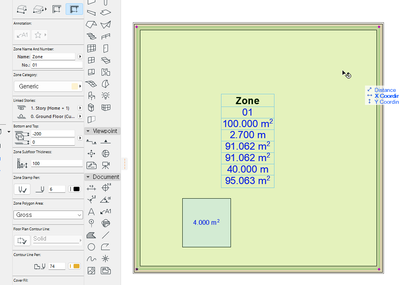
It has an area of 10X10. It is based on the REFERENCE LINE (center of the core), and I am trying to subtract the area with FILL.
But how do I set it up in SCHEDULE?
Measured Area can be used as the area of the wall centerline.
The area of the Fill minus the area cannot be obtained.
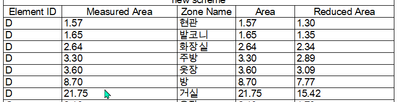
21.7454 - 5.3200 = 16.4254

AC27 on window 11
Solved! Go to Solution.
12 Replies 12

Barry Kelly
Moderator
Options
- Mark as New
- Bookmark
- Subscribe
- Mute
- Subscribe to RSS Feed
- Permalink
- Report Inappropriate Content
2022-10-21 01:32 PM
2022-10-21
01:32 PM
I would be measuring the zone to the inside of the walls.
But I guess it depends on what you want the areas for?
Only the 'measured' value would be different - the calculated areas should be the same regardless.
Whether the zones can be automatic or not depends on how your walls trim.
If there are gaps, they can not be automatic.
But you can add lines set as zone boundaries to close the gaps.
Barry.
One of the forum moderators.
Versions 6.5 to 27
i7-10700 @ 2.9Ghz, 32GB ram, GeForce RTX 2060 (6GB), Windows 10
Lenovo Thinkpad - i7-1270P 2.20 GHz, 32GB RAM, Nvidia T550, Windows 11
Versions 6.5 to 27
i7-10700 @ 2.9Ghz, 32GB ram, GeForce RTX 2060 (6GB), Windows 10
Lenovo Thinkpad - i7-1270P 2.20 GHz, 32GB RAM, Nvidia T550, Windows 11
LeeJaeYoung
Virtuoso
Options
- Mark as New
- Bookmark
- Subscribe
- Mute
- Subscribe to RSS Feed
- Permalink
- Report Inappropriate Content
2022-10-21 04:04 PM
2022-10-21
04:04 PM
Thank you. ^^
I am always grateful to you for learning a lot with your deep attention and detailed explanation.
AC27 on window 11

 Laszlo Nagy
Community Admin
Options
- Mark as New
- Bookmark
- Subscribe
- Mute
- Subscribe to RSS Feed
- Permalink
- Report Inappropriate Content
2022-10-24 12:15 AM
2022-10-24
12:15 AM
@LeeJaeYoung I recommend that your study this very comprehensive article about how Zone Areas and Volumes are calculated. It has many illustrations to help your understanding:
https://community.graphisoft.com/t5/Document-articles/Zone-Areas-and-Volumes/ta-p/336714
Loving Archicad since 1995 - Find Archicad Tips at x.com/laszlonagy
AMD Ryzen9 5900X CPU, 64 GB RAM 3600 MHz, Nvidia GTX 1060 6GB, 500 GB NVMe SSD
2x28" (2560x1440), Windows 10 PRO ENG, Ac20-Ac29
AMD Ryzen9 5900X CPU, 64 GB RAM 3600 MHz, Nvidia GTX 1060 6GB, 500 GB NVMe SSD
2x28" (2560x1440), Windows 10 PRO ENG, Ac20-Ac29

- « Previous
-
- 1
- 2
- Next »
- « Previous
-
- 1
- 2
- Next »
Didn't find the answer?
Check other topics in this Forum
Back to ForumRead the latest accepted solutions!
Accepted SolutionsStart a new conversation!

Suggested topics
- automatic sill line in window schedule in Project data & BIM
- Some free useful objects: Road signs, parametric pathway, roof crickets, crowds in Libraries & objects
- Composite wall labels in wall type schedules - please in Documentation
- Surface / Component Schedule Bug: Automatic Column Wrapping Ignores Folded Geometry and Returns Flat in Project data & BIM
- Missing elevations of doors when making a door schedule in Documentation
