Direct Hyper-model upload via your web browser is available on BIMx Model Transfer site.
You can easily upload a previously exported Hyper-model to your private storage. This option is useful when the publishing process in Archicad is long due to the file size and your internet connectivity is hectic. You might want to upload your Hyper-model in two steps:
- in step one you publish the Hyper-model locally on your machine or office server and
- in step two you upload the file to the site.
This article describes step two.
You need to be signed in with your Graphisoft ID on BIMx Model Transfer site and need to navigate to one of your folders to have this option available.
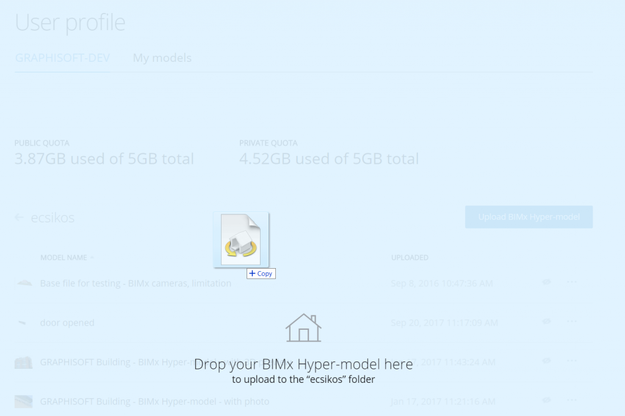
You can select the file to be uploaded by browsing in the file open dialog or you can simply drag and drop it to the target folder.
From now on the name of the person who uploaded or last updated a hyper-model will also be displayed on the download page of the Hyper-model. Thanks to this info it will be easier to track changes of the Hyper-models in the design office's storage space.
Just like when you upload from Archicad you can upload to a private folder if you have an active SSA (Software Service Agreement). If you don't have SSA, you can upload the model in the public area of the site.
Let's see the steps of the upload:
- visit BIMx Model Transfer
- sign in with your Graphisoft ID (learn more about Graphisoft ID here)
- navigate to the target folder (you can create a new folder using the +Add new folder button)
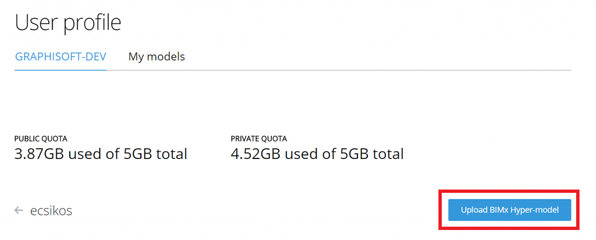
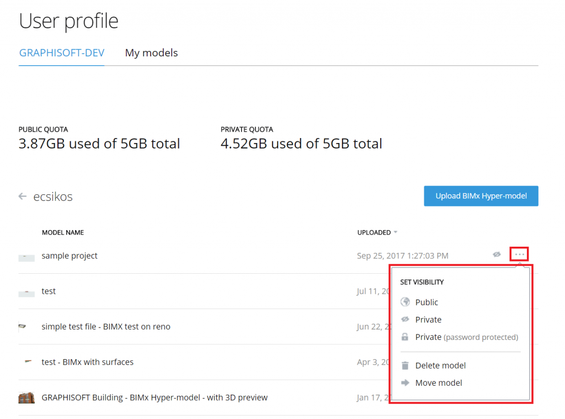
- hit the button Upload BIMx Hyper-model
- select the file you want to upload
- either hit Open or simply drag and drop the file
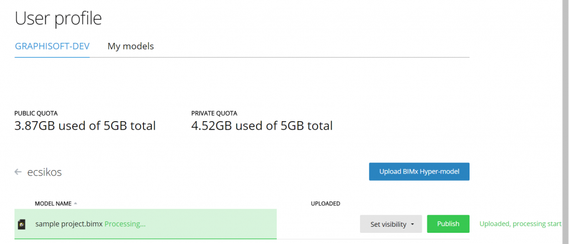
- wait for the process to finish
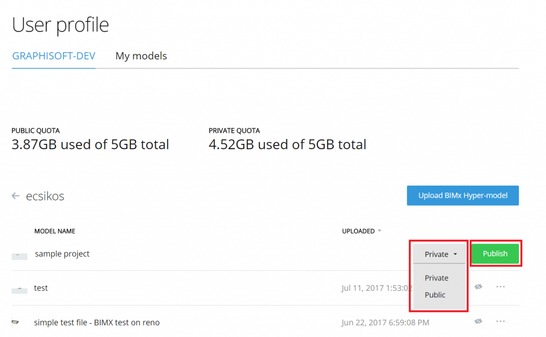
- set the visibility of the model
- hit Publish to finish the process
You can also change the visibility of the hyper-model after uploading it to the site.
NOTES:
- BIMx Model Transfer site will recognise renamed Hyper-models as updates of the Hyper-model with the original name (given in Archicad) and will list them displaying the original name.
- If you Publish to BIMx Model Transfer site from Archicad, you can rename the Hyper-model on the Project Details part of the Publisher Set Properties dialog then as a result you will have a new model with a new name on the site.
- If you change your mind and don't want to finish uploading you don't have to push the Publish button. Click on the name of the model that has just been uploaded. This will take you to the page of the model where you have the option to delete it.
- Sometimes in some browsers hitting the Open button in the file browsing windows seems to have no effect. In this case reload the page to see the upload progressing.
- Find more answers here: