
Turn on suggestions
Auto-suggest helps you quickly narrow down your search results by suggesting possible matches as you type.
Showing results for
EN
Turn on suggestions
Auto-suggest helps you quickly narrow down your search results by suggesting possible matches as you type.
Showing results for
- English
- :
- Forum
- :
- Documentation
- :
- Re: AC Font Size is wrong for all text?
Options
- Subscribe to RSS Feed
- Mark Topic as New
- Mark Topic as Read
- Pin this post for me
- Bookmark
- Subscribe to Topic
- Mute
- Printer Friendly Page

Eduardo Rolon
Moderator
Options
- Mark as New
- Bookmark
- Subscribe
- Mute
- Subscribe to RSS Feed
- Permalink
- Report Inappropriate Content
2024-02-25 09:09 PM - edited 2024-02-27 01:02 PM
AC Font Size is wrong for all text?
2024-02-25
09:09 PM
Is this incorrect?
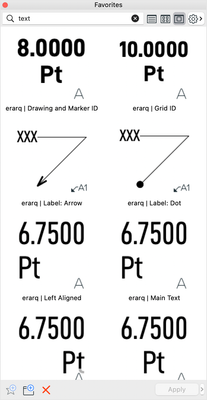
Recently I had to import a specific PDF which had specific font sizes that I had to keep.
After import and exploding the PDF the point size in AC was wrong.
It had not changed size since the drawing was at 1:1 scale but what was 18pts in Pages, Illustrator, Affinity Designer, was "reported" as 12.5 pts in AC.
If I set the font size in AC and then exported the PDF what in AC was 18 pts became 25.4 pts in every other graphics program. Size didn't change.
-----
Why is this important?
Cad Standards minimum size for dimension text is 2.5mm which converts to 7.0xx points.
As architects we are trained to place as much information as possible in the drawings and this is why we try to use the smallest font size allowed.
If you selected 7pts as your default size you have actually been using 9.9 point size.
This means that you spent more time trying to fit/arrange dimensions because of their size.
If you were required to comply to a specific fonts sizes for a project (I had 2 where they were specific about this, one of them US Federal requirements, the other for a multinational) then you are not complying.
I have no idea what the legal implications are, but at a minimum I certified that I complied with all of my clients requirements as part of the project close out and this is not true. At least the font sizes are bigger than the required ones.
-----
How long has this been the case?
No idea but I defined my favorites a long time ago and I had not noticed any size change. IIRC there were some grumblings during Betas were fonts were behaving incorrectly but the fixes were not considered important enough to be fixed.
Tried it in AC25 with the same reults
-----
Hope that I am wrong but it looks like I'll be redefining favorites and updating dim size in my current projects besides talking with my insurance…
Somebody else needs to check the MM sizes and AC's windows version…
-----
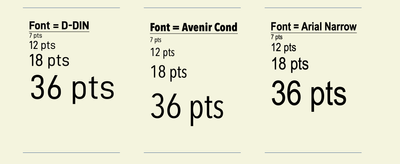
Fonts size set in AC:
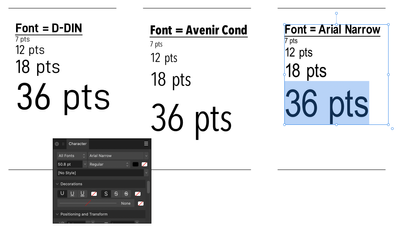
Exported as PDF and opened in Affinity Designer 36 pts is reported as 50.8 for all three font types:
In Affinity placed another set of fonts with the "correct" size:
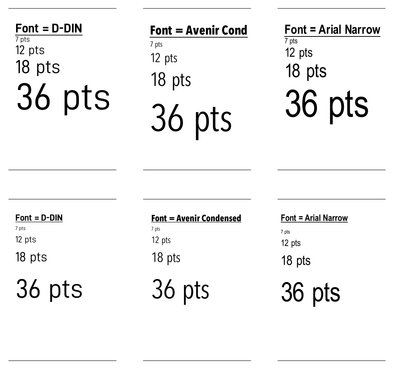
Importing the PDF into AC and exploding. The correct font sizes are shown as:
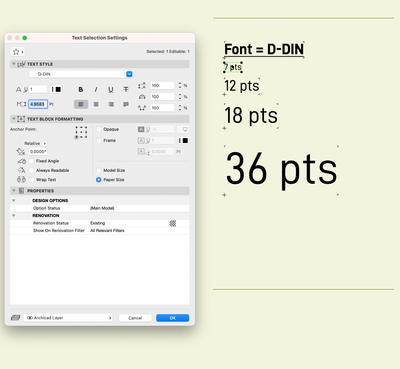
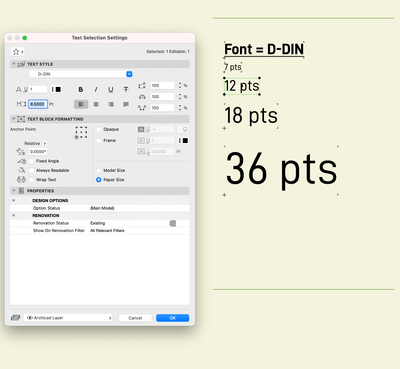
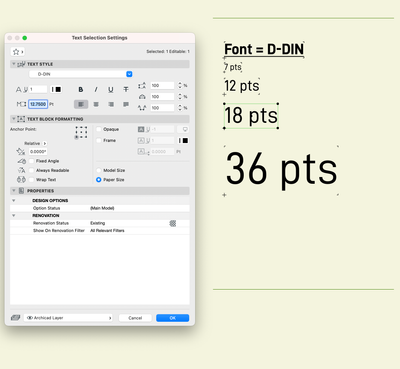
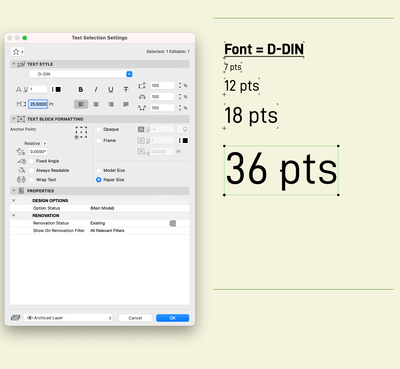
Eduardo Rolón AIA NCARB
AC29 US/INT -> AC08
AC29 US/INT -> AC08
Mac Studio M4 Max 64GB ram, OS X 10.XX latest
Labels:
- Labels:
-
Annotation
-
Dimension Tools
-
Drawings
-
Grids
-
PDF
-
Text
22 Replies 22

__archiben
Enthusiast
Options
- Mark as New
- Bookmark
- Subscribe
- Mute
- Subscribe to RSS Feed
- Permalink
- Report Inappropriate Content
7 hours ago
7 hours ago
And whilst we're at it the bounding box for the text should default to the typographic point size (EM Square height)....
b e n _ f r o s t
b f [a t ] p l a n b a r c h i t e c t u r e [d o t] n z
archicad | sketchup | morpholio | phpp
b f [a t ] p l a n b a r c h i t e c t u r e [d o t] n z
archicad | sketchup | morpholio | phpp

Lingwisyer
Guru
Options
- Mark as New
- Bookmark
- Subscribe
- Mute
- Subscribe to RSS Feed
- Permalink
- Report Inappropriate Content
6 hours ago
6 hours ago
Given Points are a typographic unit, they should match the definition and hence be the same as every other program. On the other hand, when defining in millimeters, AC is consistent with aCAD and how I was taught how to draft letters between parallel lines, so...
| AC22-29 AUS 3200 | Help Those Help You - Add a Signature |
| Self-taught, bend it till it breaks | Creating a Thread |
| Win11 | i9 10850K | 64GB | RX6600 | Win11 | 7800X3D | 32GB | RTX5070TI |
__archiben
Enthusiast
Options
- Mark as New
- Bookmark
- Subscribe
- Mute
- Subscribe to RSS Feed
- Permalink
- Report Inappropriate Content
5 hours ago
5 hours ago
...so, what I'm proposing works for everyone. A Text Size and a Text Height essentially. Text size matches typographical sizing and is in points. Always. Text Height changes with your Working units selection and is the distance between your two parallel lines.
In terms of UI it's just one extra parameter that's always linked to the other based on that formula I wrote above. One changes the other and vice versa - it's a quick deal to text size/letter height issues and confusion, and brings Archicad in line with everything else. I suspect getting the line spacing/leading, etc. working properly would require a lot more under-the-hood work though...
b e n _ f r o s t
b f [a t ] p l a n b a r c h i t e c t u r e [d o t] n z
archicad | sketchup | morpholio | phpp
b f [a t ] p l a n b a r c h i t e c t u r e [d o t] n z
archicad | sketchup | morpholio | phpp

- « Previous
- Next »
- « Previous
- Next »
Still looking?
Suggested topics
- Zone boundary excludes curtainwall footprint area. in Project data & BIM
- Favorites Palette 2.0! – Free add-on for Archicad 29 in General discussions
- Missing Window / Door Parameters in Project data & BIM
- Revision ID "00" showing "01" on Layouts & Publisher instead in Documentation
- Text Moves when Creating Object in Libraries & objects
