
Turn on suggestions
Auto-suggest helps you quickly narrow down your search results by suggesting possible matches as you type.
Showing results for
EN
Turn on suggestions
Auto-suggest helps you quickly narrow down your search results by suggesting possible matches as you type.
Showing results for
- English
- :
- Forum
- :
- Documentation
- :
- Re: As the column enters, the opening line becomes...
Options
- Subscribe to RSS Feed
- Mark Topic as New
- Mark Topic as Read
- Pin this post for me
- Bookmark
- Subscribe to Topic
- Mute
- Printer Friendly Page

LeeJaeYoung
Virtuoso
Options
- Mark as New
- Bookmark
- Subscribe
- Mute
- Subscribe to RSS Feed
- Permalink
- Report Inappropriate Content
2023-03-28
09:51 PM
- last edited on
2023-05-30
12:17 PM
by
 Rubia Torres
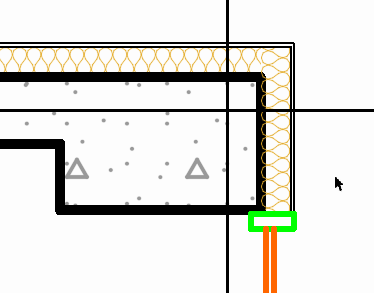
As the column enters, the opening line becomes thinner.
2023-03-28
09:51 PM
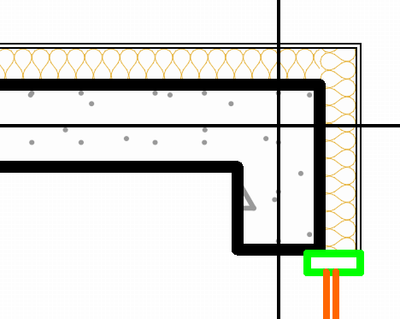
As the column enters, the opening line becomes thinner.
How do I get this line to be the original line?
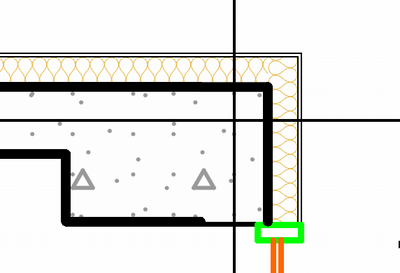
after display order
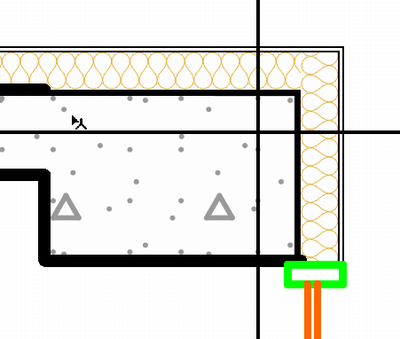
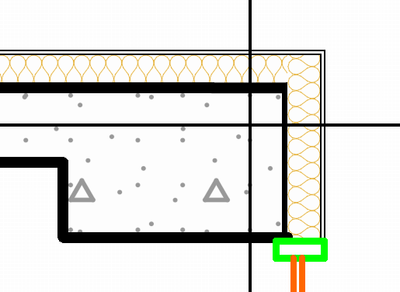
AC27 on window 11
Solved! Go to Solution.
1 Solution
Accepted Solutions

Erwin Edel
Rockstar
Options
- Mark as New
- Bookmark
- Subscribe
- Mute
- Subscribe to RSS Feed
- Permalink
- Report Inappropriate Content
2023-03-29 08:21 AM
2023-03-29
08:21 AM
All I managed to do is draft a polyline with the proper thickness on top of it, to make it look tidy.
As far as I know you're not doing anything wrong and Archicad is being weird.
Erwin Edel, Project Lead, Leloup Architecten
www.leloup.nl
ArchiCAD 9-29NED FULL
Windows 11 Pro for Workstations
Adobe Design Premium CS5
www.leloup.nl
ArchiCAD 9-29NED FULL
Windows 11 Pro for Workstations
Adobe Design Premium CS5
2 Replies 2
Erwin Edel
Rockstar
Options
- Mark as New
- Bookmark
- Subscribe
- Mute
- Subscribe to RSS Feed
- Permalink
- Report Inappropriate Content
2023-03-29 08:21 AM
2023-03-29
08:21 AM
All I managed to do is draft a polyline with the proper thickness on top of it, to make it look tidy.
As far as I know you're not doing anything wrong and Archicad is being weird.
Erwin Edel, Project Lead, Leloup Architecten
www.leloup.nl
ArchiCAD 9-29NED FULL
Windows 11 Pro for Workstations
Adobe Design Premium CS5
www.leloup.nl
ArchiCAD 9-29NED FULL
Windows 11 Pro for Workstations
Adobe Design Premium CS5
LeeJaeYoung
Virtuoso
Options
- Mark as New
- Bookmark
- Subscribe
- Mute
- Subscribe to RSS Feed
- Permalink
- Report Inappropriate Content
2023-03-29 09:14 AM - edited 2023-03-29 09:15 AM
2023-03-29
09:14 AM
thank you so much.
I also think it's a bug.
If you don't want to draw a line, you should set it to 0.
And you will have to raise the wall up.

AC27 on window 11

Still looking?

Suggested topics
- Archicad Doors and Windows with IfcOpeningElement in Project data & BIM
- BIMcloud Basic 2026.1 – Activate button does not open Graphisoft ID activation in Teamwork & BIMcloud
- Door getting offset from complex wall on 3D preview in Modeling
- Can't create custom opening (grayed out) in Modeling
- Missing libraries from TEMPLATE file in Libraries & objects
