
Turn on suggestions
Auto-suggest helps you quickly narrow down your search results by suggesting possible matches as you type.
Showing results for
EN
Turn on suggestions
Auto-suggest helps you quickly narrow down your search results by suggesting possible matches as you type.
Showing results for
- English
- :
- Developer Hub
- :
- GDL
- :
- Re: Scale or Stretch Texture on the Surface
Options
- Subscribe to RSS Feed
- Mark Topic as New
- Mark Topic as Read
- Pin this post for me
- Bookmark
- Subscribe to Topic
- Mute
- Printer Friendly Page

galiaf_velikiy
Booster
Options
- Mark as New
- Bookmark
- Subscribe
- Mute
- Subscribe to RSS Feed
- Permalink
- Report Inappropriate Content
2023-03-12
01:04 PM
- last edited on
2025-10-01
11:32 PM
by
 Laszlo Nagy
Scale or Stretch Texture on the Surface
2023-03-12
01:04 PM
Hi, guys. Could you please help me achieve the same scale effect as in SketchUp? The Unproportional Scale is also what I need. Thank you.

Labels:
- Labels:
-
Library (GDL)
11 Replies 11

Lingwisyer
Guru
Options
- Mark as New
- Bookmark
- Subscribe
- Mute
- Subscribe to RSS Feed
- Permalink
- Report Inappropriate Content
2023-03-13 02:20 AM
2023-03-13
02:20 AM
I think you can just use the COOR commands?
| AC22-29 AUS 3200 | Help Those Help You - Add a Signature |
| Self-taught, bend it till it breaks | Creating a Thread |
| Win11 | i9 10850K | 64GB | RX6600 | Win11 | 7800X3D | 32GB | RTX5070TI |
galiaf_velikiy
Booster
Options
- Mark as New
- Bookmark
- Subscribe
- Mute
- Subscribe to RSS Feed
- Permalink
- Report Inappropriate Content
2023-03-13 09:37 AM
2023-03-13
09:37 AM
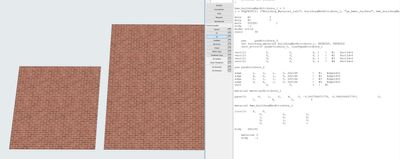
I am already using COOR3.
bms_buildingMatAttribute_1 = 0
r = REQUEST{2} ("Building_Material_info", buildingMatAttribute_1, "gs_bmat_surface", bms_buildingMatAttribute_1)

mulx	A/           3
muly	B/           3
mulz	ZZYZX/           1
body    -1
model solid
resol       36


    pen     penAttribute_2
    set building_material buildingMatAttribute_1, DEFAULT, DEFAULT
    sect_attrs{2} penAttribute_3, lineTypeAttribute_1

vert{2}	           0,            0,            0, 1	!	#1   VertId=0
vert{2}	           0,            3,            0, 1	!	#2   VertId=0
vert{2}	           3,            0,            0, 1	!	#3   VertId=0
vert{2}	           3,            3,            0, 1	!	#4   VertId=0

pen penAttribute_2

edge	   1,    3,    1,    0, 262144			!	#1   EdgeId=0
edge	   4,    2,    1,    0, 262144			!	#2   EdgeId=0
edge	   2,    1,    1,    0, 262144			!	#3   EdgeId=0
edge	   3,    4,    1,    0, 262144			!	#4   EdgeId=0
vect	           0,            0,            1	!	#1

material materialAttribute_1

pgon{3}       4,    1,    2,    6,    0, -3.000758471779, -2.992290207747,            0,            1,            0,            0,            0,            1,            0,            0,            0,            1,	!	#1   PolyId=0
		   1,		   4,		   2,		   3

material bms_buildingMatAttribute_1

coor{3}	   6,    8,
	           0,            0,            0,
	           1,            0,            0,
	           0,            1,            0,
	           0,            0,            1

body	262182

    material 0
    body    -1

Barry Kelly
Moderator
Options
- Mark as New
- Bookmark
- Subscribe
- Mute
- Subscribe to RSS Feed
- Permalink
- Report Inappropriate Content
2023-03-13 09:44 AM
2023-03-13
09:44 AM
COOR{3} can determine the origin of the surface, it direction and the method it is wrapped, but I am not 100% sure if it can stretch the surface.
Does it need to be done in GDL or can you just create a duplicate surface and increase the size of the texture?
Barry.
One of the forum moderators.
Versions 6.5 to 27
i7-10700 @ 2.9Ghz, 32GB ram, GeForce RTX 2060 (6GB), Windows 10
Lenovo Thinkpad - i7-1270P 2.20 GHz, 32GB RAM, Nvidia T550, Windows 11
Versions 6.5 to 27
i7-10700 @ 2.9Ghz, 32GB ram, GeForce RTX 2060 (6GB), Windows 10
Lenovo Thinkpad - i7-1270P 2.20 GHz, 32GB RAM, Nvidia T550, Windows 11
galiaf_velikiy
Booster
Options
- Mark as New
- Bookmark
- Subscribe
- Mute
- Subscribe to RSS Feed
- Permalink
- Report Inappropriate Content
2023-03-13 09:52 AM
2023-03-13
09:52 AM
it should be a GDL, I need it for the multiple-use case.

MetalFingerz
Advocate
Options
- Mark as New
- Bookmark
- Subscribe
- Mute
- Subscribe to RSS Feed
- Permalink
- Report Inappropriate Content
2023-03-13 05:17 PM - edited 2023-03-13 05:19 PM
2023-03-13
05:17 PM
It's possible to scale a texture dynamically by having a DEFINE TEXTURE with scaling variables (and then doing a DEFINE MATERIAL with said texture) but I don't know if it's possible to extract the texture name from a REQUESTed material.
If you already know which texture you want, you could hardcode it directly maybe.

runxel
Moderator
Options
- Mark as New
- Bookmark
- Subscribe
- Mute
- Subscribe to RSS Feed
- Permalink
- Report Inappropriate Content
2023-03-13 05:53 PM
2023-03-13
05:53 PM
It's possible, even tho you must need to do some contortions.
file_name = ""
rrr = request{2}("Material_info", old, "gs_mat_texture", file_name, w, h, mask, alpha)

define texture "new" file_name, w*2, h*2, mask, alpha

tex_id = ind(TEXTURE, "new")

str_name_of_mat = ""
rrr = request("Name_of_Material", old, str_name_of_mat)

define material "new_mat" based_on str_name_of_mat,
	parameters gs_mat_texture_ind = tex_id

mat_id = ind(MATERIAL, "new_mat")


material old
brick 1,1,0.1

addx 1.3
material mat_id
brick 1,1,0.1
Don't get hurt.
Lucas Becker | AC 29 on Mac (Sequoia) | Graphisoft Insider Panelist | Akroter.io – high-end GDL objects | Author of Runxel's Archicad Wiki | Editor at SelfGDL | Developer of the GDL plugin for Sublime Text
My List of AC shortcomings & bugs | I Will Piledrive You If You Mention AI Again |
POSIWID – The Purpose Of a System Is What It Does /// «Furthermore, I consider that Carth... yearly releases must be destroyed»
My List of AC shortcomings & bugs | I Will Piledrive You If You Mention AI Again |
POSIWID – The Purpose Of a System Is What It Does /// «Furthermore, I consider that Carth... yearly releases must be destroyed»

Victor Vernaglia
Contributor
Options
- Mark as New
- Bookmark
- Subscribe
- Mute
- Subscribe to RSS Feed
- Permalink
- Report Inappropriate Content
2025-10-01 02:56 PM
2025-10-01
02:56 PM
I copied and pasted your script (created the "old" parameter) and got the error message, am I doing something wrong?
"Error in definition of materials used at line 21 in the 3D script of file Untitled-1.gsm."
runxel
Moderator
Options
- Mark as New
- Bookmark
- Subscribe
- Mute
- Subscribe to RSS Feed
- Permalink
- Report Inappropriate Content
2025-10-01 05:24 PM
2025-10-01
05:24 PM
Could be a GDL bug? I encounter this too, in AC 28.
However it still works. So I'm not really sure why it's nagging here.
Lucas Becker | AC 29 on Mac (Sequoia) | Graphisoft Insider Panelist | Akroter.io – high-end GDL objects | Author of Runxel's Archicad Wiki | Editor at SelfGDL | Developer of the GDL plugin for Sublime Text
My List of AC shortcomings & bugs | I Will Piledrive You If You Mention AI Again |
POSIWID – The Purpose Of a System Is What It Does /// «Furthermore, I consider that Carth... yearly releases must be destroyed»
My List of AC shortcomings & bugs | I Will Piledrive You If You Mention AI Again |
POSIWID – The Purpose Of a System Is What It Does /// «Furthermore, I consider that Carth... yearly releases must be destroyed»
Victor Vernaglia
Contributor
Options
- Mark as New
- Bookmark
- Subscribe
- Mute
- Subscribe to RSS Feed
- Permalink
- Report Inappropriate Content
2025-10-01 07:45 PM
2025-10-01
07:45 PM
Yes, it's working, but this error message is very annoying. Thanks for the reply.

Didn't find the answer?
Check other topics in this Forum
Back to ForumRead the latest accepted solutions!
Accepted SolutionsStart a new conversation!

