
Turn on suggestions
Auto-suggest helps you quickly narrow down your search results by suggesting possible matches as you type.
Showing results for
EN
Turn on suggestions
Auto-suggest helps you quickly narrow down your search results by suggesting possible matches as you type.
Showing results for
- English
- :
- Forum
- :
- Libraries & objects
- :
- Re: How can I change the window frame?
Options
- Subscribe to RSS Feed
- Mark Topic as New
- Mark Topic as Read
- Pin this post for me
- Bookmark
- Subscribe to Topic
- Mute
- Printer Friendly Page

Sefa Yakut
Enthusiast
Options
- Mark as New
- Bookmark
- Subscribe
- Mute
- Subscribe to RSS Feed
- Permalink
- Report Inappropriate Content
2024-03-05
12:53 PM
- last edited on
2024-07-10
03:34 PM
by
 Aruzhan Ilaikova
How can I change the window frame?
2024-03-05
12:53 PM
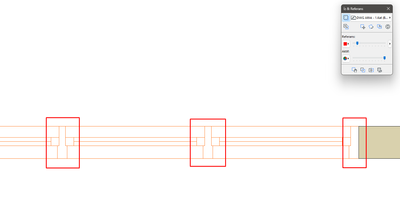
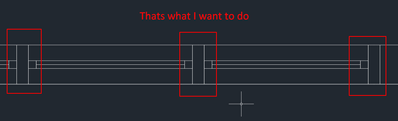
I want the frame of my window to be a simple rectangle as I have marked in the attached image, but I couldn't do it from the window settings. Does anyone have a solution?
4 Replies 4

Barry Kelly
Moderator
Options
- Mark as New
- Bookmark
- Subscribe
- Mute
- Subscribe to RSS Feed
- Permalink
- Report Inappropriate Content
2024-03-05 02:23 PM
2024-03-05
02:23 PM
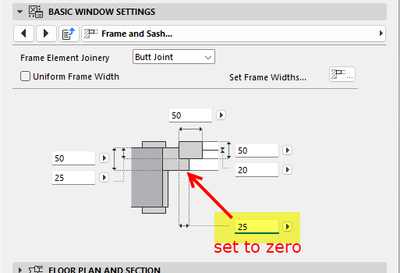
Have a look in the window settings for the frame size.
You may be able to adjust the width of the inside and outside portion of the frame so there is no lip.
I don't know what window you are using, but it might be something like this.
Barry.
One of the forum moderators.
Versions 6.5 to 27
i7-10700 @ 2.9Ghz, 32GB ram, GeForce RTX 2060 (6GB), Windows 10
Lenovo Thinkpad - i7-1270P 2.20 GHz, 32GB RAM, Nvidia T550, Windows 11
Versions 6.5 to 27
i7-10700 @ 2.9Ghz, 32GB ram, GeForce RTX 2060 (6GB), Windows 10
Lenovo Thinkpad - i7-1270P 2.20 GHz, 32GB RAM, Nvidia T550, Windows 11
Sefa Yakut
Enthusiast
Options
- Mark as New
- Bookmark
- Subscribe
- Mute
- Subscribe to RSS Feed
- Permalink
- Report Inappropriate Content
2024-03-05 02:38 PM
2024-03-05
02:38 PM
Thanks for your answer Barry.
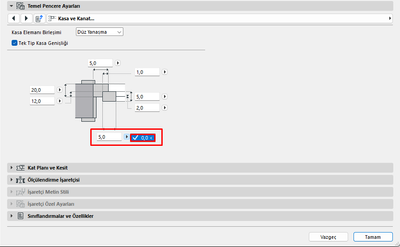
But I tried this. I can't set it to zero. It has to be higher than zero.
Barry Kelly
Moderator
Options
- Mark as New
- Bookmark
- Subscribe
- Mute
- Subscribe to RSS Feed
- Permalink
- Report Inappropriate Content
2024-03-05 02:52 PM - edited 2024-03-05 02:53 PM
2024-03-05
02:52 PM
Sorry, I should have checked properly.
I don't actually use these windows, so I am a little unfamiliar with them.
Another thing you can try, is to adjust the level of detail in the Model View Options.
Again I am unsure of the result as I am not set up to use these windows.
And your language version may have different option to mine (AUS).
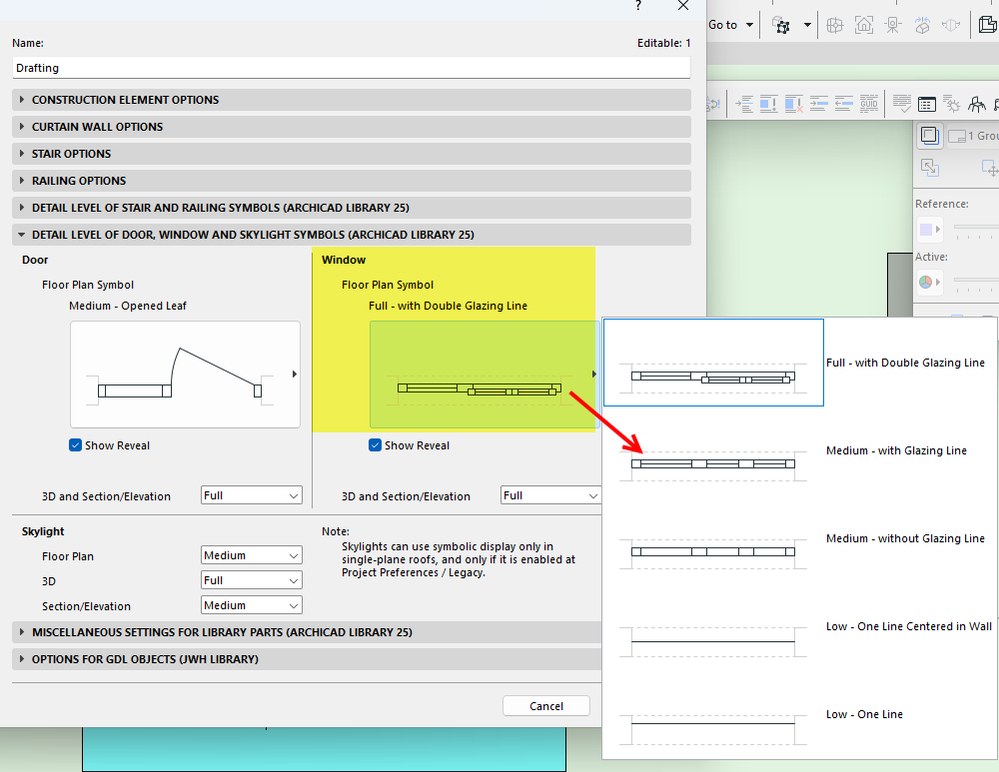
Barry.
One of the forum moderators.
Versions 6.5 to 27
i7-10700 @ 2.9Ghz, 32GB ram, GeForce RTX 2060 (6GB), Windows 10
Lenovo Thinkpad - i7-1270P 2.20 GHz, 32GB RAM, Nvidia T550, Windows 11
Versions 6.5 to 27
i7-10700 @ 2.9Ghz, 32GB ram, GeForce RTX 2060 (6GB), Windows 10
Lenovo Thinkpad - i7-1270P 2.20 GHz, 32GB RAM, Nvidia T550, Windows 11

Lingwisyer
Guru
Options
- Mark as New
- Bookmark
- Subscribe
- Mute
- Subscribe to RSS Feed
- Permalink
- Report Inappropriate Content
2024-03-06 04:00 AM
2024-03-06
04:00 AM
You have selected the wrong setting, that is the Sash Frame Width, not the Rebate Width as pointed out by Barry. Your options are mirrored to those found in AUS...
You can input 0.01 if you want to fudge it.
| AC22-29 AUS 3200 | Help Those Help You - Add a Signature |
| Self-taught, bend it till it breaks | Creating a Thread |
| Win11 | i9 10850K | 64GB | RX6600 | Win11 | 7800X3D | 32GB | RTX5070TI |

Didn't find the answer?
Check other topics in this Forum
Back to ForumRead the latest accepted solutions!
Accepted SolutionsStart a new conversation!

