
Turn on suggestions
Auto-suggest helps you quickly narrow down your search results by suggesting possible matches as you type.
Showing results for
EN
Turn on suggestions
Auto-suggest helps you quickly narrow down your search results by suggesting possible matches as you type.
Showing results for
- English
- :
- Forum
- :
- Libraries & objects
- :
- Re: W1 casement 13 pivot lines in elevations and 3...
Options
- Subscribe to RSS Feed
- Mark Topic as New
- Mark Topic as Read
- Pin this post for me
- Bookmark
- Subscribe to Topic
- Mute
- Printer Friendly Page

Anonymous
Not applicable
Options
- Mark as New
- Bookmark
- Subscribe
- Mute
- Subscribe to RSS Feed
- Permalink
- Report Inappropriate Content
2010-01-18
11:34 AM
- last edited on
2023-05-24
11:55 AM
by
 Rubia Torres
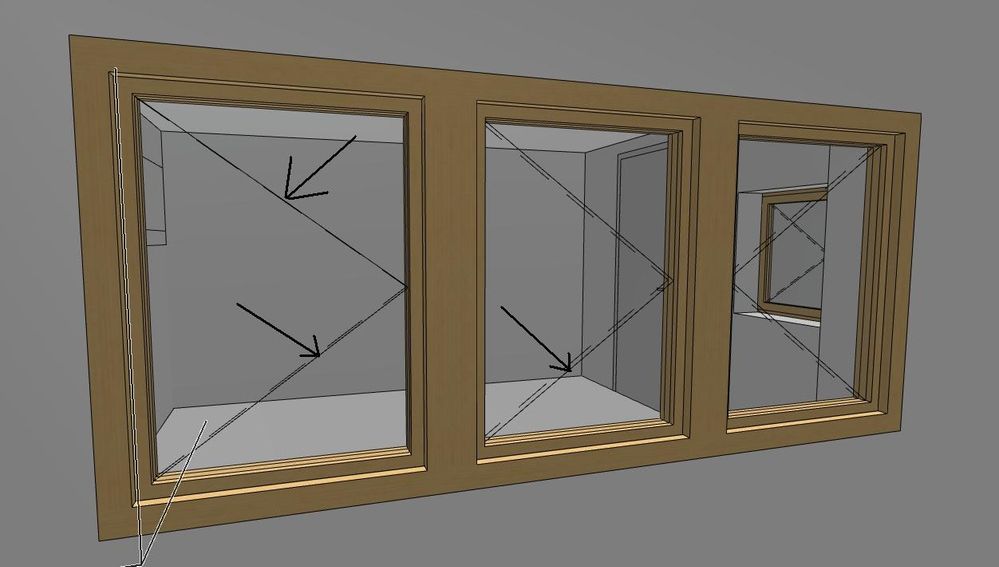
W1 casement 13 pivot lines in elevations and 3d
2010-01-18
11:34 AM
 Can some help ? Am i blind ?
thx
24 Replies 24

Kevin Motyka
Participant
Options
- Mark as New
- Bookmark
- Subscribe
- Mute
- Subscribe to RSS Feed
- Permalink
- Report Inappropriate Content
2010-08-05 09:19 PM
2010-08-05
09:19 PM
You have done a nice job Barry explaining some sample script. However, I am not yet understanding how this works. Still a little abstract for me.
Do you have a source that could shed some light? I am also not understanding the GDL reference guide either.
At this point I am not interested in creating a new tab in the MVO. I would just like to take advantage of the existing tab, either in AC 13 or 14. What are the parameter names that should be used? Is the parameter in the command (middle value) the parameter name of the libraryglobal or the script I creates parameter? What about the value (third value)?
My goal is to switch the door/window swings on my office created doors/windows to be controlled by the out of the box MVO. I am struggling where to obtain enough information to help this newbie gain some insight.
Kevin
Do you have a source that could shed some light? I am also not understanding the GDL reference guide either.
At this point I am not interested in creating a new tab in the MVO. I would just like to take advantage of the existing tab, either in AC 13 or 14. What are the parameter names that should be used? Is the parameter in the command (middle value) the parameter name of the libraryglobal or the script I creates parameter? What about the value (third value)?
My goal is to switch the door/window swings on my office created doors/windows to be controlled by the out of the box MVO. I am struggling where to obtain enough information to help this newbie gain some insight.
Kevin

Barry Kelly
Moderator
Options
- Mark as New
- Bookmark
- Subscribe
- Mute
- Subscribe to RSS Feed
- Permalink
- Report Inappropriate Content
2010-08-06 05:28 AM
2010-08-06
05:28 AM
Kevin wrote:No, I just tried to copy from the GS objects (doors and windows are way too complicated to follow!) and from the GDL referenece guide.
Do you have a source that could shed some light? I am also not understanding the GDL reference guide either.
Kevin wrote:As far as I can see from the standard GS library the door swings are controlled by with the macro "RequestDWGlobals"
At this point I am not interested in creating a new tab in the MVO. I would just like to take advantage of the existing tab, either in AC 13 or 14. What are the parameter names that should be used? Is the parameter in the command (middle value) the parameter name of the libraryglobal or the script I creates parameter? What about the value (third value)?
My goal is to switch the door/window swings on my office created doors/windows to be controlled by the out of the box MVO. I am struggling where to obtain enough information to help this newbie gain some insight.
Kevin
So in your objects you need to call this macro.
This macro checks the values of the MVO and sets some other parameters.
success = LIBRARYGLOBAL ("LibraryGlobals13", "D_showBOpLine3D", bOplinesTemp)
if success > 0 and bOplinesTemp <> 0 then
bOplines = bOplinesTemp

reqOplinePen = 1
success = LIBRARYGLOBAL ("LibraryGlobals13", "D_opLinePen", reqOplinePen)
if success > 0 then
gs_opLinePen= reqOplinePen
endif
endif
bOplines - is the 3D door line on/off value
opLinePen - is the 3D door line pen colour
So in your object I would create a new Boolean (on/off) parameter “Use_MVO_3D_doorswings”
Then in the parameter script of your objects call the “RequestDWGlobal” macro like this.
If Use_MVO_3D_doorswings = 1 then
CALL "RequestDWGlobals" PARAMETERS A=A, B=B,
RETURNED_PARAMETERS bOplines, opLinePen
if bOplines = 1 then
my_door_swing lines = 1
my_door_swing_pen = opLinePen
endif
PARAMETERS my_door_swing lines = my_door_swing lines, my_door_swing_pen = my_door_swing_pen
endif
This way you can choose in you object whether you want to use the MVO settings or not.
“my_door_swing lines” and “my_door_swing_pen” you will need to change to be the same as your parameters in your objects that control the line on/off and pen colour.
I hope this helps (I have written this without actually testing it).
Barry.
One of the forum moderators.
Versions 6.5 to 27
i7-10700 @ 2.9Ghz, 32GB ram, GeForce RTX 2060 (6GB), Windows 10
Lenovo Thinkpad - i7-1270P 2.20 GHz, 32GB RAM, Nvidia T550, Windows 11
Versions 6.5 to 27
i7-10700 @ 2.9Ghz, 32GB ram, GeForce RTX 2060 (6GB), Windows 10
Lenovo Thinkpad - i7-1270P 2.20 GHz, 32GB RAM, Nvidia T550, Windows 11
Kevin Motyka
Participant
Options
- Mark as New
- Bookmark
- Subscribe
- Mute
- Subscribe to RSS Feed
- Permalink
- Report Inappropriate Content
2010-08-06 12:23 PM
2010-08-06
12:23 PM
Barry,
I am very thankful for the help you have provided!!
I will look into this macro more. That sounds like a good start in the right direction for understanding what parameter names I need to seek for different controls.
You have provided many items to consider. I will try your suggestions and see how it goes. If I get stuck I will be back on this forum.
Thanks again Barry!
Kevin
I am very thankful for the help you have provided!!
I will look into this macro more. That sounds like a good start in the right direction for understanding what parameter names I need to seek for different controls.
No, I just tried to copy from the GS objects (doors and windows are way too complicated to follow!) and from the GDL referenece guide.Thank you for saying this. I thought that was only my perspective.
You have provided many items to consider. I will try your suggestions and see how it goes. If I get stuck I will be back on this forum.
Thanks again Barry!
Kevin
Kevin Motyka
Participant
Options
- Mark as New
- Bookmark
- Subscribe
- Mute
- Subscribe to RSS Feed
- Permalink
- Report Inappropriate Content
2010-08-06 09:15 PM
2010-08-06
09:15 PM
Barry,
This communicates an error stating that the second line is uninitialized.
Kevin
This communicates an error stating that the second line is uninitialized.
success = LIBRARYGLOBAL ("LibraryGlobals13", "D_showBOpLine3D", bOplinesTemp)
if success > 0 and bOplinesTemp <> 0 then
bOplines = bOplinesTemp

reqOplinePen = 1
success = LIBRARYGLOBAL ("LibraryGlobals13", "D_opLinePen", reqOplinePen)
if success > 0 then
gs_opLinePen= reqOplinePen
endif
endif
I have been unable to get beyond this point.Kevin
Barry Kelly
Moderator
Options
- Mark as New
- Bookmark
- Subscribe
- Mute
- Subscribe to RSS Feed
- Permalink
- Report Inappropriate Content
2010-08-09 08:11 AM
2010-08-09
08:11 AM
Kevin wrote:I'm not sure what is happening there.
Barry,
This communicates an error stating that the second line is uninitialized.
success = LIBRARYGLOBAL ("LibraryGlobals13", "D_showBOpLine3D", bOplinesTemp) if success > 0 and bOplinesTemp <> 0 then bOplines = bOplinesTemp reqOplinePen = 1 success = LIBRARYGLOBAL ("LibraryGlobals13", "D_opLinePen", reqOplinePen) if success > 0 then gs_opLinePen= reqOplinePen endif endifI have been unable to get beyond this point.
Kevin
But you don't need to add this to your objects.
I probably wasn't very clear but this is part of the macro that gets the values from the MVO settings.
In you object in the parameter script you should just need to add ...
Bur not originally I had the returned parameter "opLinePen" when it should be "gs_opLinePen"
If Use_MVO_3D_doorswings = 1 then
CALL "RequestDWGlobals" PARAMETERS A=A, B=B,
RETURNED_PARAMETERS bOplines, gs_opLinePen
if bOplines = 1 then
my_door_swing_lines = 1
my_door_swing_pen = gs_opLinePen
endif
PARAMETERS my_door_swing_lines = my_door_swing_lines, my_door_swing_pen = my_door_swing_pen
endif
You will need to create a parameter for ... Use_MVO_3D_doorswings
And the parameters "my_door_swing lines" & "my_door_swing_pen" need to be changed to whatever the parameter names for these are in your objects.
Mind you I just tried something quick and I couldn't get it to work with the default Graphisoft library.
Must be something more complicated in there that I am missing.
My own parts work fine but then I made my own MVO object page.
Barry.
One of the forum moderators.
Versions 6.5 to 27
i7-10700 @ 2.9Ghz, 32GB ram, GeForce RTX 2060 (6GB), Windows 10
Lenovo Thinkpad - i7-1270P 2.20 GHz, 32GB RAM, Nvidia T550, Windows 11
Versions 6.5 to 27
i7-10700 @ 2.9Ghz, 32GB ram, GeForce RTX 2060 (6GB), Windows 10
Lenovo Thinkpad - i7-1270P 2.20 GHz, 32GB RAM, Nvidia T550, Windows 11
- « Previous
- Next »
- « Previous
- Next »
Didn't find the answer?
Check other topics in this Forum
Back to ForumRead the latest accepted solutions!
Accepted SolutionsStart a new conversation!

Suggested topics
- Railing and Curtain Wall in Modeling
- Texture Fill with boundary lines in elevation. in Documentation
- Grid line (D) in elevation keeps disappearing in Documentation
- how to get dashed line in interior elevation for MEP elements such as pipes? in Libraries & objects
- Problem with lines in elevations in Modeling
