
Turn on suggestions
Auto-suggest helps you quickly narrow down your search results by suggesting possible matches as you type.
Showing results for
EN
Turn on suggestions
Auto-suggest helps you quickly narrow down your search results by suggesting possible matches as you type.
Showing results for
Options
- Subscribe to RSS Feed
- Mark Topic as New
- Mark Topic as Read
- Pin this post for me
- Bookmark
- Subscribe to Topic
- Mute
- Printer Friendly Page

EH21
Enthusiast
Options
- Mark as New
- Bookmark
- Subscribe
- Mute
- Subscribe to RSS Feed
- Permalink
- Report Inappropriate Content
2022-07-19
09:44 PM
- last edited on
2023-05-09
03:21 PM
by
 Rubia Torres
Intersection Priority Not Working Slab & Wall
2022-07-19
09:44 PM
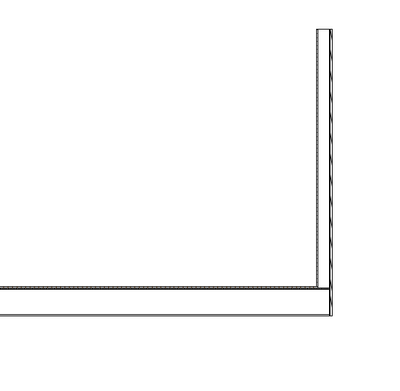
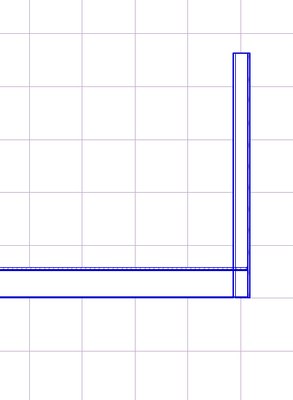
I have been working on a new project template based off the AC22 template. Within the AC22 template, I'm able to make intersection priority between wall and floor composites work fine. However, when I make building materials and composites with the exact same settings in my old template file, the intersection priority does not appear to work in section. Is there another setting in Archicad to control whether intersection priorities are working? See screenshots. Image 1 is within the AC22 template & Image 2 is in my old project file. Pen sets are different, so it appears blue in the old file.
Note: no graphic overrides are set in either. Component parts are on exact same layers in each file.
Solved! Go to Solution.
1 Solution
Accepted Solutions

Barry Kelly
Moderator
Options
- Mark as New
- Bookmark
- Subscribe
- Mute
- Subscribe to RSS Feed
- Permalink
- Report Inappropriate Content
2022-07-20 05:10 PM
2022-07-20
05:10 PM
Project Preferences > Legacy ?
Barry.
One of the forum moderators.
Versions 6.5 to 27
i7-10700 @ 2.9Ghz, 32GB ram, GeForce RTX 2060 (6GB), Windows 10
Lenovo Thinkpad - i7-1270P 2.20 GHz, 32GB RAM, Nvidia T550, Windows 11
Versions 6.5 to 27
i7-10700 @ 2.9Ghz, 32GB ram, GeForce RTX 2060 (6GB), Windows 10
Lenovo Thinkpad - i7-1270P 2.20 GHz, 32GB RAM, Nvidia T550, Windows 11
Solution
5 Replies 5

Lingwisyer
Guru
Options
- Mark as New
- Bookmark
- Subscribe
- Mute
- Subscribe to RSS Feed
- Permalink
- Report Inappropriate Content
2022-07-20 03:37 AM
2022-07-20
03:37 AM
Check your layers Intersection Group. They need to be the same.
| AC22-29 AUS 3200 | Help Those Help You - Add a Signature |
| Self-taught, bend it till it breaks | Creating a Thread |
| Win11 | i9 10850K | 64GB | RX6600 | Win11 | 7800X3D | 32GB | RTX5070TI |
Barry Kelly
Moderator
Options
- Mark as New
- Bookmark
- Subscribe
- Mute
- Subscribe to RSS Feed
- Permalink
- Report Inappropriate Content
2022-07-20 03:50 AM
2022-07-20
03:50 AM
Just to clarify what Lingwisyer said, if your wall and slab are in different layers, then those layers need to have the same intersection group number for automatic connections.
Barry.
One of the forum moderators.
Versions 6.5 to 27
i7-10700 @ 2.9Ghz, 32GB ram, GeForce RTX 2060 (6GB), Windows 10
Lenovo Thinkpad - i7-1270P 2.20 GHz, 32GB RAM, Nvidia T550, Windows 11
Versions 6.5 to 27
i7-10700 @ 2.9Ghz, 32GB ram, GeForce RTX 2060 (6GB), Windows 10
Lenovo Thinkpad - i7-1270P 2.20 GHz, 32GB RAM, Nvidia T550, Windows 11
EH21
Enthusiast
Options
- Mark as New
- Bookmark
- Subscribe
- Mute
- Subscribe to RSS Feed
- Permalink
- Report Inappropriate Content
2022-07-20 04:57 PM
2022-07-20
04:57 PM
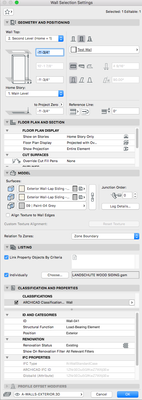
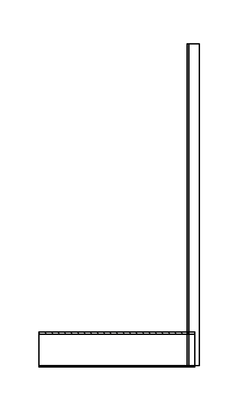
Something is still missing. Intersection group numbers are all currently set to 1, floor + plywood priorities are set to 800 and 790, wall + gypsum board are set to to 300 & 100, and it still shows up like this. They both have the same fills (Wood - structural). Is there some setting elsewhere to enable intersection priorities to work??
The other odd thing that the surfaces in my file do not default to the surfaces of the composite building materials...I have to set them independently (see screenshot). Do you think this could be related to the problem I'm having?
Barry Kelly
Moderator
Options
- Mark as New
- Bookmark
- Subscribe
- Mute
- Subscribe to RSS Feed
- Permalink
- Report Inappropriate Content
2022-07-20 05:10 PM
2022-07-20
05:10 PM
Project Preferences > Legacy ?
Barry.
One of the forum moderators.
Versions 6.5 to 27
i7-10700 @ 2.9Ghz, 32GB ram, GeForce RTX 2060 (6GB), Windows 10
Lenovo Thinkpad - i7-1270P 2.20 GHz, 32GB RAM, Nvidia T550, Windows 11
Versions 6.5 to 27
i7-10700 @ 2.9Ghz, 32GB ram, GeForce RTX 2060 (6GB), Windows 10
Lenovo Thinkpad - i7-1270P 2.20 GHz, 32GB RAM, Nvidia T550, Windows 11
Solution
EH21
Enthusiast
Options
- Mark as New
- Bookmark
- Subscribe
- Mute
- Subscribe to RSS Feed
- Permalink
- Report Inappropriate Content
2022-07-20 05:45 PM
2022-07-20
05:45 PM
You have much wisdom. Such a simple answer I should have thought of.

Still looking?

Suggested topics
- Surface / Component Schedule Bug: Automatic Column Wrapping Ignores Folded Geometry and Returns Flat in Project data & BIM
- After more than three decades with Archicad: has Graphisoft lost touch with professional offices? in General discussions
- Send to Back in General discussions
- PBC between columns and wall - how to control the surface of the removed part in Modeling
- The symbols for elbows in pipes are not displayed correctly. in Modeling
