
Turn on suggestions
Auto-suggest helps you quickly narrow down your search results by suggesting possible matches as you type.
Showing results for
EN
Turn on suggestions
Auto-suggest helps you quickly narrow down your search results by suggesting possible matches as you type.
Showing results for
Options
- Subscribe to RSS Feed
- Mark Topic as New
- Mark Topic as Read
- Pin this post for me
- Bookmark
- Subscribe to Topic
- Mute
- Printer Friendly Page

Karol Lozinski
Enthusiast
Options
- Mark as New
- Bookmark
- Subscribe
- Mute
- Subscribe to RSS Feed
- Permalink
- Report Inappropriate Content
2019-09-24
11:11 PM
- last edited on
2023-05-24
08:10 AM
by
 Rubia Torres
Wall and beam in section view - wrong pens
2019-09-24
11:11 PM
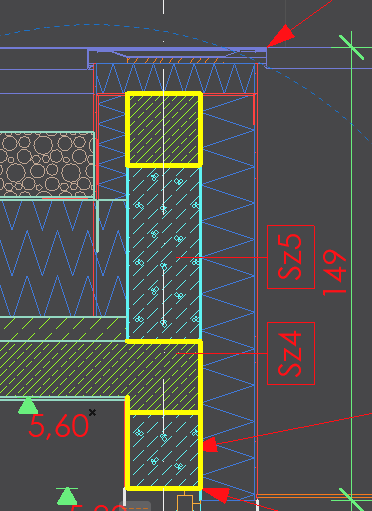
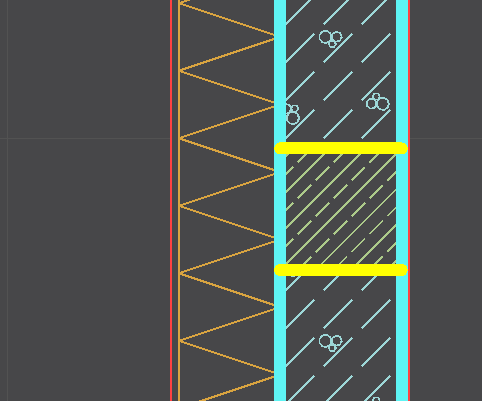
I've tried to find sollution on forum, but just coulnd't find right topic. Thing is with this:
I have a beam inside a wall and all I want to have is to see clean line around the beam like this
While all I get is this
What is weird is that when the beam is aside it all looks good. Just as soon as I align it within the wall it all messes up.
Please, please help. I am pulling my hair out for an hour now. I have already tried different material priorities, and took it to extreme, I have also tried layer priorities (which are "turned on" right now, the beam has "2" while wall "1") and the last image is the best I can get.
AC 28 Win 11

2 Replies 2

Lingwisyer
Guru
Options
- Mark as New
- Bookmark
- Subscribe
- Mute
- Subscribe to RSS Feed
- Permalink
- Report Inappropriate Content
2019-09-25 03:35 AM
2019-09-25
03:35 AM
Right click => Display Order?
| AC22-29 AUS 3200 | Help Those Help You - Add a Signature |
| Self-taught, bend it till it breaks | Creating a Thread |
| Win11 | i9 10850K | 64GB | RX6600 | Win11 | 7800X3D | 32GB | RTX5070TI |
Karol Lozinski
Enthusiast
Options
- Mark as New
- Bookmark
- Subscribe
- Mute
- Subscribe to RSS Feed
- Permalink
- Report Inappropriate Content
2019-09-25 10:18 AM
2019-09-25
10:18 AM
I forgot to mention - that was the first thing that I tried. Walls are at the most bottom and the beam is on the top.
AC 28 Win 11

Still looking?

Suggested topics
