
Turn on suggestions
Auto-suggest helps you quickly narrow down your search results by suggesting possible matches as you type.
Showing results for
EN
Turn on suggestions
Auto-suggest helps you quickly narrow down your search results by suggesting possible matches as you type.
Showing results for
- English
- :
- Forum
- :
- Project data & BIM
- :
- Re: How to aovid the time (clock) in "issued date"...
Options
- Subscribe to RSS Feed
- Mark Topic as New
- Mark Topic as Read
- Pin this post for me
- Bookmark
- Subscribe to Topic
- Mute
- Printer Friendly Page

Anonymous
Not applicable
Options
- Mark as New
- Bookmark
- Subscribe
- Mute
- Subscribe to RSS Feed
- Permalink
- Report Inappropriate Content
2017-11-29 09:22 AM - last edited on 2026-03-31 07:27 PM by Eduardo Rolon
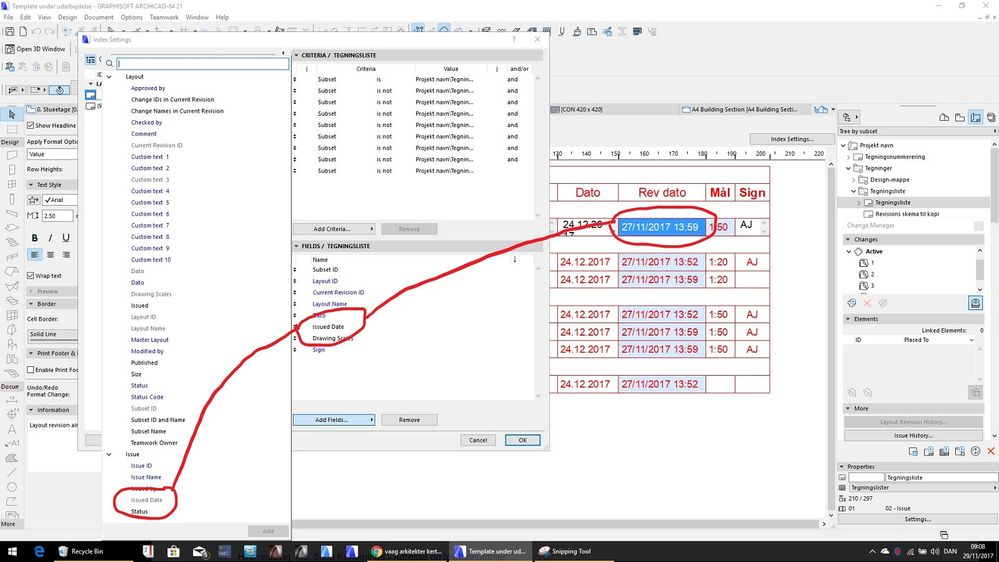
How to avoid the time (clock) in "issued date" field
2017-11-29
09:22 AM
Hi guys.
When placing the field "Issued date" in an index the value will be showed as both date and time...
Example: "27/11/2017 13:59"
Anyway to edit this field so it will only show the date...
Workaroaunds will do as long as they´re automatically linked to the actual "Issued date"
Any tips or tricks will be appreciated.
Cheers
When placing the field "Issued date" in an index the value will be showed as both date and time...
Example: "27/11/2017 13:59"
Anyway to edit this field so it will only show the date...
Workaroaunds will do as long as they´re automatically linked to the actual "Issued date"
Any tips or tricks will be appreciated.
Cheers
15 Replies 15
Anonymous
Not applicable
Options
- Mark as New
- Bookmark
- Subscribe
- Mute
- Subscribe to RSS Feed
- Permalink
- Report Inappropriate Content
2022-10-28 05:59 AM
2022-10-28
05:59 AM
Wow, talk about not responding to customers...
A pointless +1 to have this resolved!

Sculptdesign
Booster
Options
- Mark as New
- Bookmark
- Subscribe
- Mute
- Subscribe to RSS Feed
- Permalink
- Report Inappropriate Content
2023-03-16 08:31 AM
2023-03-16
08:31 AM
Bump
ArchiCAD 26 Solo - Mac

ArchicadGuruWan
Contributor
Options
- Mark as New
- Bookmark
- Subscribe
- Mute
- Subscribe to RSS Feed
- Permalink
- Report Inappropriate Content
2023-03-22 04:49 AM
2023-03-22
04:49 AM
Still not resolved???
We put men on the moon in 69!!!

Barry Kelly
Moderator
Options
- Mark as New
- Bookmark
- Subscribe
- Mute
- Subscribe to RSS Feed
- Permalink
- Report Inappropriate Content
2023-03-22 05:41 AM
2023-03-22
05:41 AM
Liquid paper on your screen.
That will solve it. 🤣
Barry.
One of the forum moderators.
Versions 6.5 to 27
i7-10700 @ 2.9Ghz, 32GB ram, GeForce RTX 2060 (6GB), Windows 10
Lenovo Thinkpad - i7-1270P 2.20 GHz, 32GB RAM, Nvidia T550, Windows 11
Versions 6.5 to 27
i7-10700 @ 2.9Ghz, 32GB ram, GeForce RTX 2060 (6GB), Windows 10
Lenovo Thinkpad - i7-1270P 2.20 GHz, 32GB RAM, Nvidia T550, Windows 11

alexk124
Newcomer
Options
- Mark as New
- Bookmark
- Subscribe
- Mute
- Subscribe to RSS Feed
- Permalink
- Report Inappropriate Content
2024-07-29 11:31 PM
2024-07-29
11:31 PM
2024 and still need a solution for this.

Eduardo Rolon
Moderator
Options
- Mark as New
- Bookmark
- Subscribe
- Mute
- Subscribe to RSS Feed
- Permalink
- Report Inappropriate Content
2024-07-29 11:58 PM
2024-07-29
11:58 PM
The workaround since forever is to create a custom field with that information and use that instead of the automatic one which is a variation of what @Erwin Edel suggested some years ago.
Eduardo Rolón AIA NCARB
AC29 US/INT -> AC08
AC29 US/INT -> AC08
Mac Studio M4 Max 64GB ram, OS X 10.XX latest
- « Previous
-
- 1
- 2
- Next »
- « Previous
-
- 1
- 2
- Next »
Didn't find the answer?
Check other topics in this Forum
Back to ForumRead the latest accepted solutions!
Accepted SolutionsStart a new conversation!
Suggested topics
- 2D Plan Preview scale changes unexpectedly in Interactive Schedule in Project data & BIM
- How to schedule the surface area (m2) of a Complex Profile used as a Railing sub-element? in Project data & BIM
- Profile wall issue in Modeling
- Component Schedule Expression Limitation (Need Help plz) in Project data & BIM
- Component Schedule issue in Project data & BIM
