
Turn on suggestions
Auto-suggest helps you quickly narrow down your search results by suggesting possible matches as you type.
Showing results for
EN
Turn on suggestions
Auto-suggest helps you quickly narrow down your search results by suggesting possible matches as you type.
Showing results for
- English
- :
- Forum
- :
- Documentation
- :
- Re: Exporting plan to jpeg
Options
- Subscribe to RSS Feed
- Mark Topic as New
- Mark Topic as Read
- Pin this post for me
- Bookmark
- Subscribe to Topic
- Mute
- Printer Friendly Page

dhnguyen
Contributor
Options
- Mark as New
- Bookmark
- Subscribe
- Mute
- Subscribe to RSS Feed
- Permalink
- Report Inappropriate Content
2022-02-25 05:39 PM
Exporting plan to jpeg
2022-02-25
05:39 PM
I've had this problem for the longest time and I can't seem to figure it out. Everytime I export a floor plan to jpeg format, the file looks so blurry and I can't read anything.
The way I export the files are as follow: Organizer: Select the files> choose pjeg or tiff for under Format and this is the quality that I'm getting. What are the other ways I could try so the image looks much better?
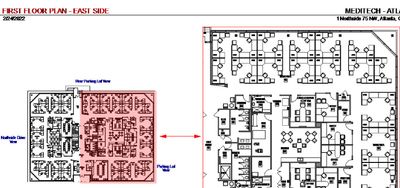
DNguyen
ArchiCAD 18- 25
(expert in AutoCAD, novice in ArchiCAD)
ArchiCAD 18- 25
(expert in AutoCAD, novice in ArchiCAD)
Read-Only
6 Replies 6

Rajesh Patil
Expert
Options
- Mark as New
- Bookmark
- Subscribe
- Mute
- Subscribe to RSS Feed
- Permalink
- Report Inappropriate Content
2022-02-26 04:32 AM
2022-02-26
04:32 AM
What exactly you trying to do with this vector base data exported as jpeg? As its not rendered image controlling on its resolution is not in control.
Rajesh Patil
AC 09-27 | INT | WIN11 64
Dell Inspiron 7591, Core i9, 9880H 2.30GHz, 16.0GB, NVidia GeForce GTX1650, 4.0GB, SSD Internal 500GB, Dell SSD External 250GB
AC 09-27 | INT | WIN11 64
Dell Inspiron 7591, Core i9, 9880H 2.30GHz, 16.0GB, NVidia GeForce GTX1650, 4.0GB, SSD Internal 500GB, Dell SSD External 250GB

Djordje
Moderator Emeritus
Options
- Mark as New
- Bookmark
- Subscribe
- Mute
- Subscribe to RSS Feed
- Permalink
- Report Inappropriate Content
2022-02-26 11:34 AM
2022-02-26
11:34 AM
Why are you exporting to JPG?
What do you want to achieve?
Djordje
ArchiCAD since 4.55 ... 1995
HP Omen
ArchiCAD since 4.55 ... 1995
HP Omen
Djordje
Moderator Emeritus
Options
- Mark as New
- Bookmark
- Subscribe
- Mute
- Subscribe to RSS Feed
- Permalink
- Report Inappropriate Content
2022-02-26 11:56 AM
2022-02-26
11:56 AM
I would say you need to learn how to define the views and place them on the layouts... think View=Model Space, Layout=PaperSpace, but MUCH better. Lots of good videos on the Archicad YouTube channel on the topic. Start watching.
Djordje
ArchiCAD since 4.55 ... 1995
HP Omen
ArchiCAD since 4.55 ... 1995
HP Omen
dhnguyen
Contributor
Options
- Mark as New
- Bookmark
- Subscribe
- Mute
- Subscribe to RSS Feed
- Permalink
- Report Inappropriate Content
2022-02-28 02:19 AM
2022-02-28
02:19 AM
Generally I would export them as PDFs and the drawing would look perfect, but my company uses a software that doesn't accept PDF so I need to convert them all to images.
DNguyen
ArchiCAD 18- 25
(expert in AutoCAD, novice in ArchiCAD)
ArchiCAD 18- 25
(expert in AutoCAD, novice in ArchiCAD)

Barry Kelly
Moderator
Options
- Mark as New
- Bookmark
- Subscribe
- Mute
- Subscribe to RSS Feed
- Permalink
- Report Inappropriate Content
2022-02-28 02:46 AM
2022-02-28
02:46 AM
The only way I know to control the quality of a JPG file is when you render it.
But you can only render from a 3D window - so no help here.
All I can think of is to save as a PDF.
Then find a PDF to JPG converter out there in the interweb.
I have never tried any so have no recommendations of if they even work or if you can control the quality still, but there seems to be plenty out there.
Barry.
One of the forum moderators.
Versions 6.5 to 27
i7-10700 @ 2.9Ghz, 32GB ram, GeForce RTX 2060 (6GB), Windows 10
Lenovo Thinkpad - i7-1270P 2.20 GHz, 32GB RAM, Nvidia T550, Windows 11
Versions 6.5 to 27
i7-10700 @ 2.9Ghz, 32GB ram, GeForce RTX 2060 (6GB), Windows 10
Lenovo Thinkpad - i7-1270P 2.20 GHz, 32GB RAM, Nvidia T550, Windows 11

Lingwisyer
Guru
Options
- Mark as New
- Bookmark
- Subscribe
- Mute
- Subscribe to RSS Feed
- Permalink
- Report Inappropriate Content
2022-02-28 03:05 AM - edited 2022-02-28 03:06 AM
2022-02-28
03:05 AM
Place the PDF as a Smart Object in Photoshop / Affinity and set the sheet DPI to what ever is still suitable for when you zoom in then save it as a JPG.
| AC22-29 AUS 3200 | Help Those Help You - Add a Signature |
| Self-taught, bend it till it breaks | Creating a Thread |
| Win11 | i9 10850K | 64GB | RX6600 | Win11 | 7800X3D | 32GB | RTX5070TI |

Still looking?

Suggested topics
- Publisher: Use Layout ID as exported filename in Documentation
- Keynote conflict - import IFC in Documentation
- Solved: Graphisoft MEP Elements Missing During DWG Export Due to Work Environment Profile in Collaboration with other software
- Model View Options UX missing in Libraries & objects
- Export plan from view map to DWG, keep rotation in Collaboration with other software
