
Turn on suggestions
Auto-suggest helps you quickly narrow down your search results by suggesting possible matches as you type.
Showing results for
EN
Turn on suggestions
Auto-suggest helps you quickly narrow down your search results by suggesting possible matches as you type.
Showing results for
- English
- :
- Forum
- :
- Documentation
- :
- Re: Zone Label comes with NCS wall label
Options
- Subscribe to RSS Feed
- Mark Topic as New
- Mark Topic as Read
- Pin this post for me
- Bookmark
- Subscribe to Topic
- Mute
- Printer Friendly Page

Gisele
Advocate
Options
- Mark as New
- Bookmark
- Subscribe
- Mute
- Subscribe to RSS Feed
- Permalink
- Report Inappropriate Content
2023-06-02 05:30 PM
Zone Label comes with NCS wall label
2023-06-02
05:30 PM
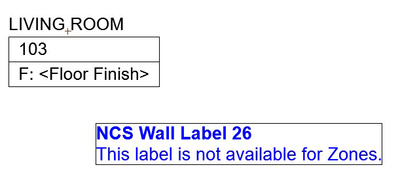
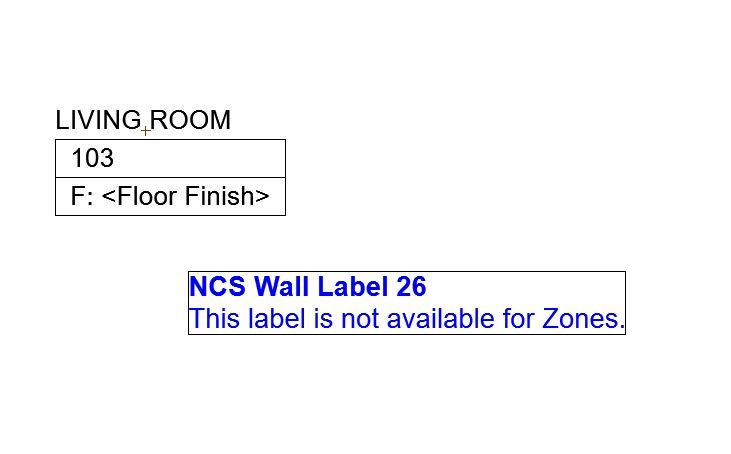
When I place a zone label, I also get a "separate" wall label that I can delete. Not sure how to restore the zone label.
AC 26 - 5002 USA FULL
Win11 Pro 22H2 - 13th Gen Intel(R) Core(TM) i9-13900KF 3.00 GHz - 64 GB - 64-bit operating system, x64-based processor
Win11 Pro 22H2 - 13th Gen Intel(R) Core(TM) i9-13900KF 3.00 GHz - 64 GB - 64-bit operating system, x64-based processor
Solved! Go to Solution.
Solved
Labels:
- Labels:
-
Annotation
2 Solutions
Accepted Solutions

JeffH
Expert
Options
- Mark as New
- Bookmark
- Subscribe
- Mute
- Subscribe to RSS Feed
- Permalink
- Report Inappropriate Content
2023-06-05 02:32 PM
2023-06-05
02:32 PM
The additional label is most likely due to this option being selected

If you unclick that box, no additional label will be added.
If you want a specific different label, create and place whatever you want, and eye drop to pick up those parameters..
Next time you go to place a zone, it will place that label along with the zone/stamp.
AC24 / AC26 / AC27
Win10
Win10

 Laszlo Nagy
Community Admin
Options
- Mark as New
- Bookmark
- Subscribe
- Mute
- Subscribe to RSS Feed
- Permalink
- Report Inappropriate Content
2023-06-09 12:45 AM
2023-06-09
12:45 AM
What I think happens here is Gisele is placing a Zone with its Zone Stamp (the black one), and because of the setting JeffH refers to, a Label is also placed for the Zone. Probably a Wall Label is selected by default and this is why a Wall Label is placed along the Zone Stamp.
Loving Archicad since 1995 - Find Archicad Tips at x.com/laszlonagy
AMD Ryzen9 5900X CPU, 64 GB RAM 3600 MHz, Nvidia GTX 1060 6GB, 500 GB NVMe SSD
2x28" (2560x1440), Windows 10 PRO ENG, Ac20-Ac29
AMD Ryzen9 5900X CPU, 64 GB RAM 3600 MHz, Nvidia GTX 1060 6GB, 500 GB NVMe SSD
2x28" (2560x1440), Windows 10 PRO ENG, Ac20-Ac29
3 Replies 3

Gerry Leonor
Advisor
Options
- Mark as New
- Bookmark
- Subscribe
- Mute
- Subscribe to RSS Feed
- Permalink
- Report Inappropriate Content
2023-06-05 04:59 AM
2023-06-05
04:59 AM
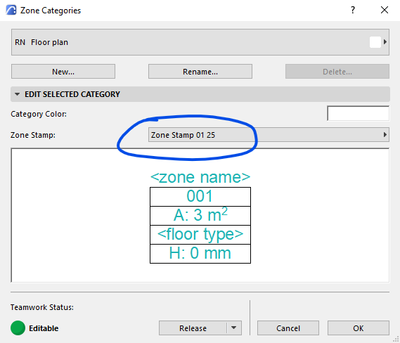
not sure why 2 zones would appear, but out of curiousity, what Zone Stamp is currently called up in your Zone Category settings???
(Options > Attributes > Zone Categories)
AC27 | Win11 | 64Gb RAM | Intel i7 13700F | RTX 4070 Ti
>come join our unofficial Discord server
https://discord.gg/XGHjyvutt8
>come join our unofficial Discord server
https://discord.gg/XGHjyvutt8
JeffH
Expert
Options
- Mark as New
- Bookmark
- Subscribe
- Mute
- Subscribe to RSS Feed
- Permalink
- Report Inappropriate Content
2023-06-05 02:32 PM
2023-06-05
02:32 PM
The additional label is most likely due to this option being selected
If you unclick that box, no additional label will be added.
If you want a specific different label, create and place whatever you want, and eye drop to pick up those parameters..
Next time you go to place a zone, it will place that label along with the zone/stamp.
AC24 / AC26 / AC27
Win10
Win10
Laszlo Nagy
Community Admin
Options
- Mark as New
- Bookmark
- Subscribe
- Mute
- Subscribe to RSS Feed
- Permalink
- Report Inappropriate Content
2023-06-09 12:45 AM
2023-06-09
12:45 AM
What I think happens here is Gisele is placing a Zone with its Zone Stamp (the black one), and because of the setting JeffH refers to, a Label is also placed for the Zone. Probably a Wall Label is selected by default and this is why a Wall Label is placed along the Zone Stamp.
Loving Archicad since 1995 - Find Archicad Tips at x.com/laszlonagy
AMD Ryzen9 5900X CPU, 64 GB RAM 3600 MHz, Nvidia GTX 1060 6GB, 500 GB NVMe SSD
2x28" (2560x1440), Windows 10 PRO ENG, Ac20-Ac29
AMD Ryzen9 5900X CPU, 64 GB RAM 3600 MHz, Nvidia GTX 1060 6GB, 500 GB NVMe SSD
2x28" (2560x1440), Windows 10 PRO ENG, Ac20-Ac29

Still looking?

