
Turn on suggestions
Auto-suggest helps you quickly narrow down your search results by suggesting possible matches as you type.
Showing results for
EN
Turn on suggestions
Auto-suggest helps you quickly narrow down your search results by suggesting possible matches as you type.
Showing results for
- English
- :
- Forum
- :
- Documentation
- :
- DWG export - messed up draw order
Options
- Subscribe to RSS Feed
- Mark Topic as New
- Mark Topic as Read
- Pin this post for me
- Bookmark
- Subscribe to Topic
- Mute
- Printer Friendly Page

Mike96
Advocate
Options
- Mark as New
- Bookmark
- Subscribe
- Mute
- Subscribe to RSS Feed
- Permalink
- Report Inappropriate Content
2023-09-07 07:41 AM
DWG export - messed up draw order
2023-09-07
07:41 AM
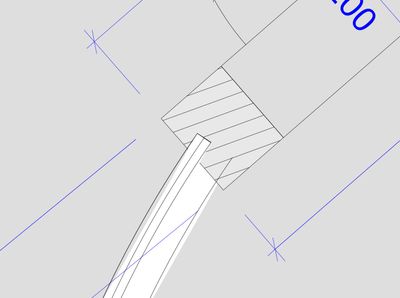
There is a problem with exporting DWG drawings from Worksheets.
The screenshot below is from AutoCAD and shows how draw order of lines and fills / hatches got messed up upon export. Originally, the column is displayed on top of the window, but that order was not preserved in many spots. You can see the original drawing in the attached PLN.
Is there any way of fixing this besides manually trimming all geometries before exporting?
I tried various settings of translators.
ArchiCAD 25
Windows 10
Windows 10
3 Replies 3
Mike96
Advocate
Options
- Mark as New
- Bookmark
- Subscribe
- Mute
- Subscribe to RSS Feed
- Permalink
- Report Inappropriate Content
2023-09-13 11:08 AM

 Zoltan Vale
Graphisoft
Options
- Mark as New
- Bookmark
- Subscribe
- Mute
- Subscribe to RSS Feed
- Permalink
- Report Inappropriate Content
2024-07-17 08:55 AM
2024-07-17
08:55 AM
Hi @Mike96 ,
A bit of a late response, but maybe for the future: we were not able to reproduce the issue with any newly created files, so it must be something particular with this file. What we found to fix the issue is using the "Send to Back" and "Bring to Front" commands from the context menu on the elements.
Zoltán Válé
GRAPHISOFT Product Manager
GRAPHISOFT Product Manager
Mike96
Advocate
Options
- Mark as New
- Bookmark
- Subscribe
- Mute
- Subscribe to RSS Feed
- Permalink
- Report Inappropriate Content
2024-09-05 07:37 AM
2024-09-05
07:37 AM
of course but imagine doing that manually for hundreds of elements in a drawing, every time it has to be updated...
Manual corrections are out of question, they would take forever.
I think it's just Archicad that doesn't properly handle draw order for DWGs.
ArchiCAD 25
Windows 10
Windows 10

Still looking?

Suggested topics
- Custom tags for Layout info? in Documentation
- DWG export Fill issue in Collaboration with other software
- Cannot load .e57 Point Cloud as a .lcf file to the teamwork project in Archicad 28 in Teamwork & BIMcloud
- Schedules list Measured Area Total m2 in Documentation
- Attributes nightmare caught up with me in Project data & BIM
