
Turn on suggestions
Auto-suggest helps you quickly narrow down your search results by suggesting possible matches as you type.
Showing results for
EN
Turn on suggestions
Auto-suggest helps you quickly narrow down your search results by suggesting possible matches as you type.
Showing results for
Options
- Subscribe to RSS Feed
- Mark Topic as New
- Mark Topic as Read
- Pin this post for me
- Bookmark
- Subscribe to Topic
- Mute
- Printer Friendly Page

Kikoria
Enthusiast
Options
- Mark as New
- Bookmark
- Subscribe
- Mute
- Subscribe to RSS Feed
- Permalink
- Report Inappropriate Content
2023-06-30 02:48 PM
Sandwich Panel
2023-06-30
02:48 PM
Hi everybody. I was wondering, can I create sandwich panel by using wall tool?
The panel looks like this:
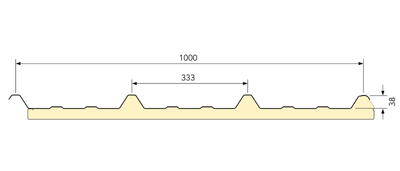

I built it using railing tool. It was easy, but I couldn't create an opening inside of it. Then I tried to dig into log wall but couldn't get the desired result. Is there any way in the wall tool to make sandwich panel like this?
Thank you in advance!
Kind regards,
Tamaz Kikoria
Architect
Technical Examination and Design Department
GEORGIAN WATER & POWER
Tamaz Kikoria
Architect
Technical Examination and Design Department
GEORGIAN WATER & POWER
Solved! Go to Solution.
Solved
Labels:
- Labels:
-
Complex Profiles
-
Openings
-
Walls
20 Replies 20

Barry Kelly
Moderator
Options
- Mark as New
- Bookmark
- Subscribe
- Mute
- Subscribe to RSS Feed
- Permalink
- Report Inappropriate Content
2023-07-03 01:20 PM
2023-07-03
01:20 PM
I don't think they work with the accessories.
I would assume they are stand alone objects that you just have to put in place.
When you get them from BIMObject, does it say how you are supposed to use them?
I don't have a BIMComponent login so I have not downloaded any.
I would assume it is just an object that you can change the size of.
Maybe @mija can expand on how to use them with an accessory add-on?
Barry.
One of the forum moderators.
Versions 6.5 to 27
i7-10700 @ 2.9Ghz, 32GB ram, GeForce RTX 2060 (6GB), Windows 10
Lenovo Thinkpad - i7-1270P 2.20 GHz, 32GB RAM, Nvidia T550, Windows 11
Versions 6.5 to 27
i7-10700 @ 2.9Ghz, 32GB ram, GeForce RTX 2060 (6GB), Windows 10
Lenovo Thinkpad - i7-1270P 2.20 GHz, 32GB RAM, Nvidia T550, Windows 11
Kikoria
Enthusiast
Options
- Mark as New
- Bookmark
- Subscribe
- Mute
- Subscribe to RSS Feed
- Permalink
- Report Inappropriate Content
2023-07-03 01:31 PM
2023-07-03
01:31 PM
Got it, thanks. But if we use accessories as sandwich panel modelling tool, how can we use it? there are only certain tools in accessories library and there's no sandwich panel-like thing in there.
Kind regards,
Tamaz Kikoria
Architect
Technical Examination and Design Department
GEORGIAN WATER & POWER
Tamaz Kikoria
Architect
Technical Examination and Design Department
GEORGIAN WATER & POWER

mija
Enthusiast
Options
- Mark as New
- Bookmark
- Subscribe
- Mute
- Subscribe to RSS Feed
- Permalink
- Report Inappropriate Content
2023-07-03
01:53 PM
- last edited on
2026-04-03
03:23 PM
by
 Laszlo Nagy
2023-07-03
01:53 PM
So this is how I use them..
I downloaded the first one from this manufacturer https://www.bimobject.com/en/europerfil/product/atica_1100_pur

- Add it to your Library manager

-
Draw a wall, select it and follow the path

- select your panel and customize it as you want
- Then your cursor will be like an angled eye so you select on which side of the wall you want your panel (sorry, dont know how to screenshot the cursor)

Taa-daa
- When adding windows/doors you place them to the main wall like this


- accessories will follow any modification of the wall
- You can play with other libraries and objects from bimobject website, but they pretty much work the same.
Hope this helped!
Archicad 26, build 3001
Montenegro
mija
Enthusiast
Options
- Mark as New
- Bookmark
- Subscribe
- Mute
- Subscribe to RSS Feed
- Permalink
- Report Inappropriate Content
2023-07-03 01:59 PM
2023-07-03
01:59 PM
Also when I have only sandwich panel as my wall, I use air building material wall with 1cm thickness. And when I am finished I change it to 0cm so it's not visible. Then accessory will not follow the wall modification since it has no thickness.
So make sure it has when you are adding windows or doors etc.
Archicad 26, build 3001
Montenegro

Erwin Edel
Rockstar
Options
- Mark as New
- Bookmark
- Subscribe
- Mute
- Subscribe to RSS Feed
- Permalink
- Report Inappropriate Content
2023-07-03
02:08 PM
- last edited on
2026-04-03
03:24 PM
by
Laszlo Nagy
2023-07-03
02:08 PM
Alternative solution:
- a simple composite with the outer layer as the max. thickness of the panel:

- a whole lot of columns on a hidden layer with a building material that has higher priority than the outer skin to punch holes
resulting in:

I use columns since they automatically clean up with walls.
Erwin Edel, Project Lead, Leloup Architecten
www.leloup.nl
ArchiCAD 9-29NED FULL
Windows 11 Pro for Workstations
Adobe Design Premium CS5
www.leloup.nl
ArchiCAD 9-29NED FULL
Windows 11 Pro for Workstations
Adobe Design Premium CS5
Kikoria
Enthusiast
Options
- Mark as New
- Bookmark
- Subscribe
- Mute
- Subscribe to RSS Feed
- Permalink
- Report Inappropriate Content
2023-07-03 02:35 PM
2023-07-03
02:35 PM
Thank you!
Kind regards,
Tamaz Kikoria
Architect
Technical Examination and Design Department
GEORGIAN WATER & POWER
Tamaz Kikoria
Architect
Technical Examination and Design Department
GEORGIAN WATER & POWER
Kikoria
Enthusiast
Options
- Mark as New
- Bookmark
- Subscribe
- Mute
- Subscribe to RSS Feed
- Permalink
- Report Inappropriate Content
2023-07-03 02:36 PM
2023-07-03
02:36 PM
Thanks a lot!
Kind regards,
Tamaz Kikoria
Architect
Technical Examination and Design Department
GEORGIAN WATER & POWER
Tamaz Kikoria
Architect
Technical Examination and Design Department
GEORGIAN WATER & POWER
Barry Kelly
Moderator
Options
- Mark as New
- Bookmark
- Subscribe
- Mute
- Subscribe to RSS Feed
- Permalink
- Report Inappropriate Content
2023-07-04 03:30 AM
2023-07-04
03:30 AM
Thanks Mija.
So it is created as a wall accessory object.
I thought it might have just been a static object that you had to place and multiply.
Much better that is is actually an accessory object itself.
Barry.
One of the forum moderators.
Versions 6.5 to 27
i7-10700 @ 2.9Ghz, 32GB ram, GeForce RTX 2060 (6GB), Windows 10
Lenovo Thinkpad - i7-1270P 2.20 GHz, 32GB RAM, Nvidia T550, Windows 11
Versions 6.5 to 27
i7-10700 @ 2.9Ghz, 32GB ram, GeForce RTX 2060 (6GB), Windows 10
Lenovo Thinkpad - i7-1270P 2.20 GHz, 32GB RAM, Nvidia T550, Windows 11

fabioverissimoT
Booster
Options
- Mark as New
- Bookmark
- Subscribe
- Mute
- Subscribe to RSS Feed
- Permalink
- Report Inappropriate Content
2026-03-25 04:46 PM - edited 2026-03-25 04:47 PM
2026-03-25
04:46 PM
hi!
Does anyone still using this object?
I've been strugling with it. When using Archicad starts using a lot of ram, going from 10GB to 54 and sometimes it gives the error "not enough memory to complete the task".
Using Archicad 29 in windows 11 in a teamwork project.
Versions 12 to 29
AMD Ryzen 5700x, 32GB RAM, RX580 8GB
Windows 11 & OS X Monterey
Intel Core i7-13700KF, 64GB RAM, Nvidia RTX 4070 SUPER 12GB
Windows 11
AMD Ryzen 5700x, 32GB RAM, RX580 8GB
Windows 11 & OS X Monterey
Intel Core i7-13700KF, 64GB RAM, Nvidia RTX 4070 SUPER 12GB
Windows 11

Patrick M
Virtuoso
Options
- Mark as New
- Bookmark
- Subscribe
- Mute
- Subscribe to RSS Feed
- Permalink
- Report Inappropriate Content
2026-03-25 05:44 PM
2026-03-25
05:44 PM
complex profile columns can also work, in lieu of hte add-on/goodies... just be aware of polygon count and profile complexity, and you'll need to patch them around door/window openings
BIM solutions and trouble shooting (self proclaimed) expert. Using Archicad Version (all of them), on Mac OS (whatever is 1 version older than current)

Still looking?

Suggested topics
- Custom Railing Panel in Modeling
- 2D Plan Preview scale changes unexpectedly in Interactive Schedule in Project data & BIM
- How to schedule the surface area (m2) of a Complex Profile used as a Railing sub-element? in Project data & BIM
- Railing and Curtain Wall in Modeling
- Garage Door 3D representation in Libraries & objects
